This integration allows organizations to leverage their existing authentication infrastructure, ensuring a seamless and secure login experience for users. By using LDAP, Dengage can authenticate users against centralized directories, providing robust access control and simplifying user management. This feature enhances security, improves compliance, and streamlines the authentication process, making it easier to manage user identities and permissions within the platform.
This section provides an overview of the existing third-party authentication configurations.
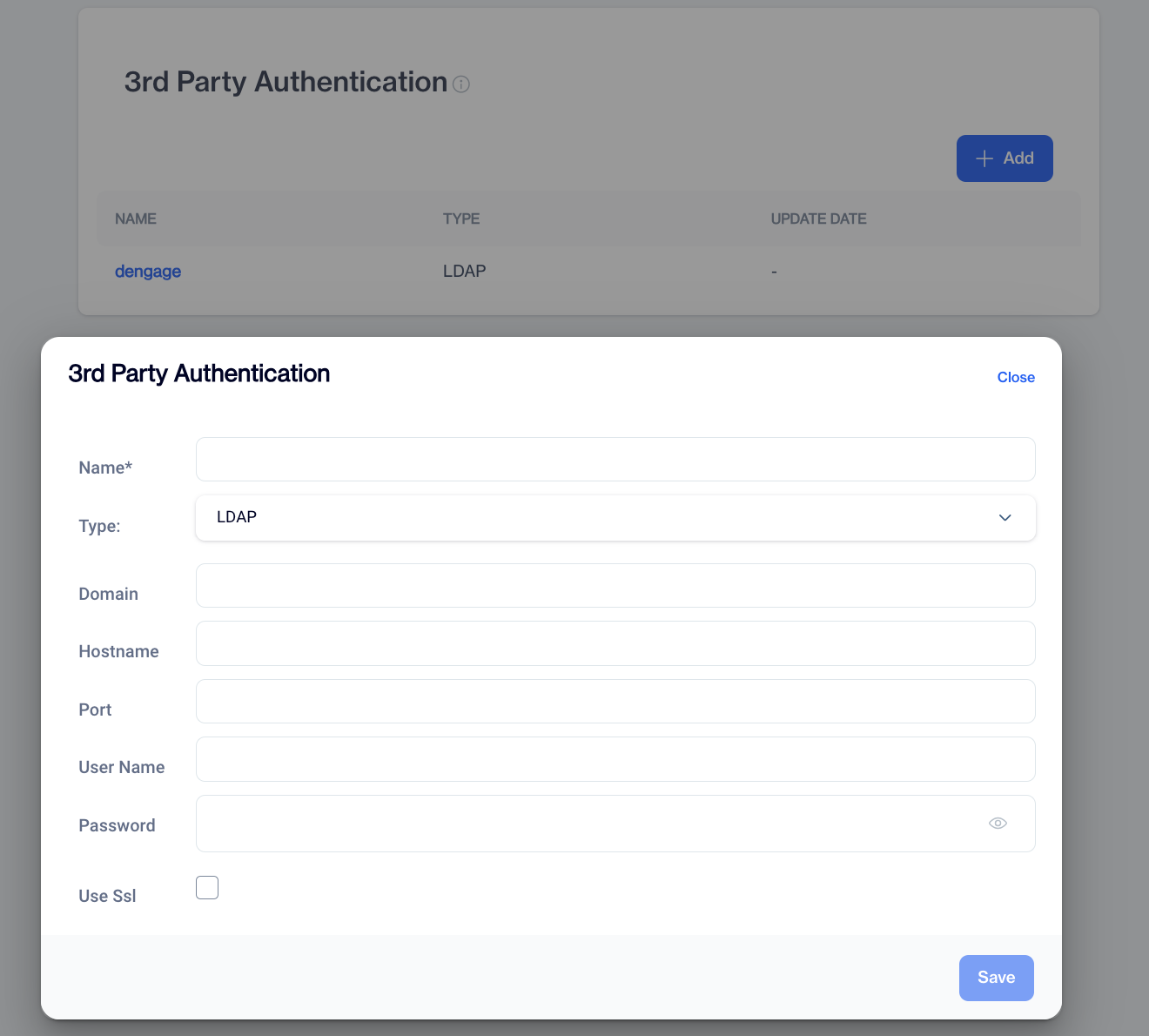
3rd Party Authentication
To navigate this page to enable 3rd Party Integration, clicking this item will display the main page of this section as follows:
1.Overview:
This section provides an overview of the existing third-party authentication configurations.
Name: Displays the name of the authentication provider, identifying the service used for authentication.
Type: Specifies the type of authentication provider, such as LDAP.
LDAPDengage currently only supports LDAP authentication.
Update Date: Indicates the date when the authentication configuration was last updated or modified.
2.Add:Users can add new third-party authentication configurations in this section.
- Name: Users specify a name for the new authentication configuration, aiding in easy identification within the app.
- Type: Users select the type of authentication provider they want to add from the available options.
How to Configure LDAP Parameters
Other Options for LDAP:
- Domain: Users enter the domain associated with the authentication provider, ensuring correct routing of authentication requests.
- Host name: Specifies the hostname or server address of the authentication provider's endpoint.
- Port: Specifies the port number through which the app communicates with the authentication provider.
- Username: Users provide their username or identifier for authenticating with the third-party service.
- Password: Users enter their password associated with the provided username.
- Use SSL (Checkbox): Users can choose to enable Secure Sockets Layer (SSL) encryption for secure communication with the authentication provider by checking this box.
- Save: This option allows users to save the newly added authentication configuration. Once saved, the app will utilize the specified settings for third-party authentication, ensuring secure and seamless access to authorized users.