Exporting Campaign Control Group Info via Incremental Logs
The Campaign Control Group Contacts log type is now available under Incremental Logs, allowing users to export detailed control group data used in campaigns. This enhancement supports transparency and auditability by providing direct access to contacts excluded from campaign sends due to control group logic.
How to Access
Navigation Path: Data Space > Data Management > Automated Flows
To access this feature, navigate to Data Space > Data Management > Automated Flows. This is where you can define and manage export flows using various trigger and action configurations.
How to Use
Follow the steps below to export Campaign Control Group Contacts using Automated Flows with Incremental Logs:
- Create a New Automated Flow; Begin by navigating to Data Space > Data Management > Automated Flows. Click the New button. From the options, select Automated Flow. Give your flow a meaningful name, set the Start Date and End Date, and click Next to continue.
- Configure the Flow Screen; Once inside the flow design interface, drag and drop the Recurring trigger onto the canvas. Set the frequency according to how often you'd like the data exported (e.g., daily). Then drag the Data Export node into the Actions section.
- Configure the Data Export Node; Click the Data Export node to begin configuration. Select Incremental Logs as the data source type, and click Next.
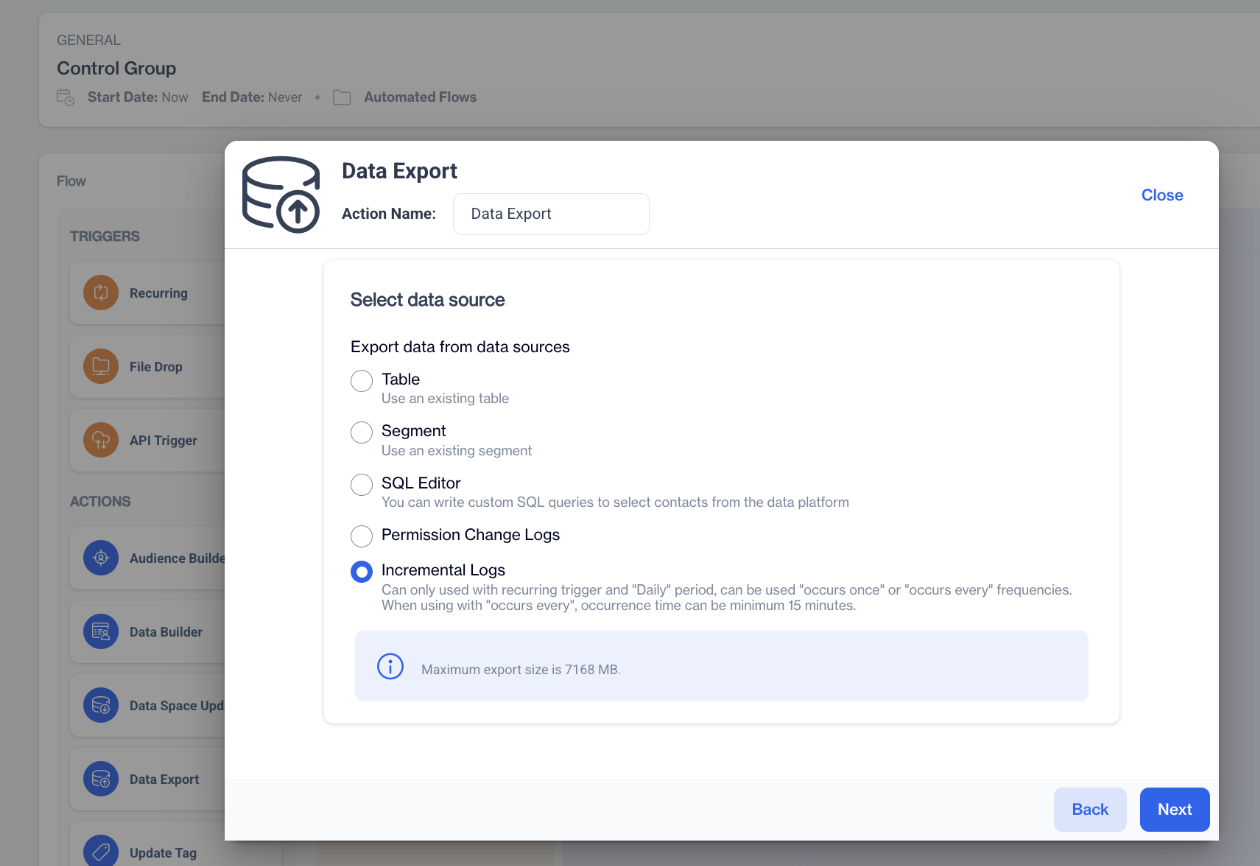
Incremental Logs
- Select Log Type; On the Incremental Logs selection screen, you'll see two sections: Transactional and Marketing. Under the Marketing section, select Campaign Control Group Contacts. Click Next to proceed.
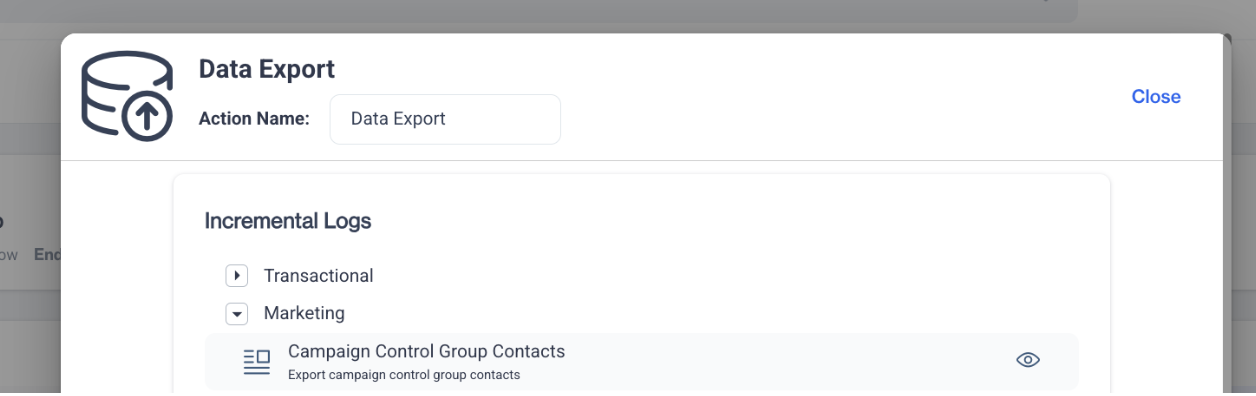
Campaign Control Group Contacts
- Select Remote Target; In the remote target configuration step, choose the desired export destination from the available options. Click Next.
- Review and Complete; On the summary screen, review your selections:
- Data Source: Campaign Control Group Contacts
- Target Type: your selected remote destination
Confirm your setup and save the flow.
Related Articles
Exporting Incremental Logs to Databases via Remote Target
With this update, database export capability in the Automated Flow module has been enhanced. You can now export Incremental Logs directly to supported databases such as MySQL and others via Remote Target integration. Prerequisites A Remote Target ...Incremental Logs - Column Details
Transactional Panel Audit Logs Column Name Column Type Column Length log_id STRING 36 request_time TIMESTAMP N/A user_id INTEGER N/A user_name STRING 150 name STRING 400 action_name STRING 1000 request_url STRING 1000 request_json STRING MAX ...FTP Export Support for Incremental Logs
The FTP Export option is now available as a remote target for Incremental Logs in Automated Flows. This enhancement allows users to export any supported incremental data directly to an external FTP server on a scheduled basis. It simplifies external ...Targeting On-site Campaign
Once your on-site content is successfully generated, you can make any necessary changes and save it as a draft for later use. If you’re ready to launch, publish the content to prepare it for your on-site campaigns. To create a campaign directly on ...Event Logs
The Event Logs feature provides detailed insights into campaign activities, ensuring transparency and enabling in-depth analysis of performance and system actions. The Event Logs screen displays key details about recorded events: Name: The name of ...