Interactive Segment with Remote Table
This new feature allows users to create segments by Remote Table with Interactive Segment, without writing any SQL query.
How to Define a Remote Data Table
- Access the Remote Data Table
- Navigate to: Data Spaces > Tables > New > Remote Data Table.
- Select a Remote Source
- Choose the data source that contains the table you want to use.
- Select a Schema
- If "Pull With Table Name" is selected:
- Enter the table name directly in the provided field.
- If "Select From Schema" is selected:
- Choose a schema from the listing page.
- Select Columns
- After selecting a table, its columns will be automatically fetched and listed.
- Select one or more columns to use.
- Ensure that one of the selected columns is a "Contact Key" column. Its type must be “Text” and “not Null”.
How to Access
- Navigate to: Audience > Segments > New.
- Select Interactive as the segment type.
- Add a Name and Description for the segment.
- Click Next to proceed to the Filters section.
How to Create Interactive Segment with Remote Table
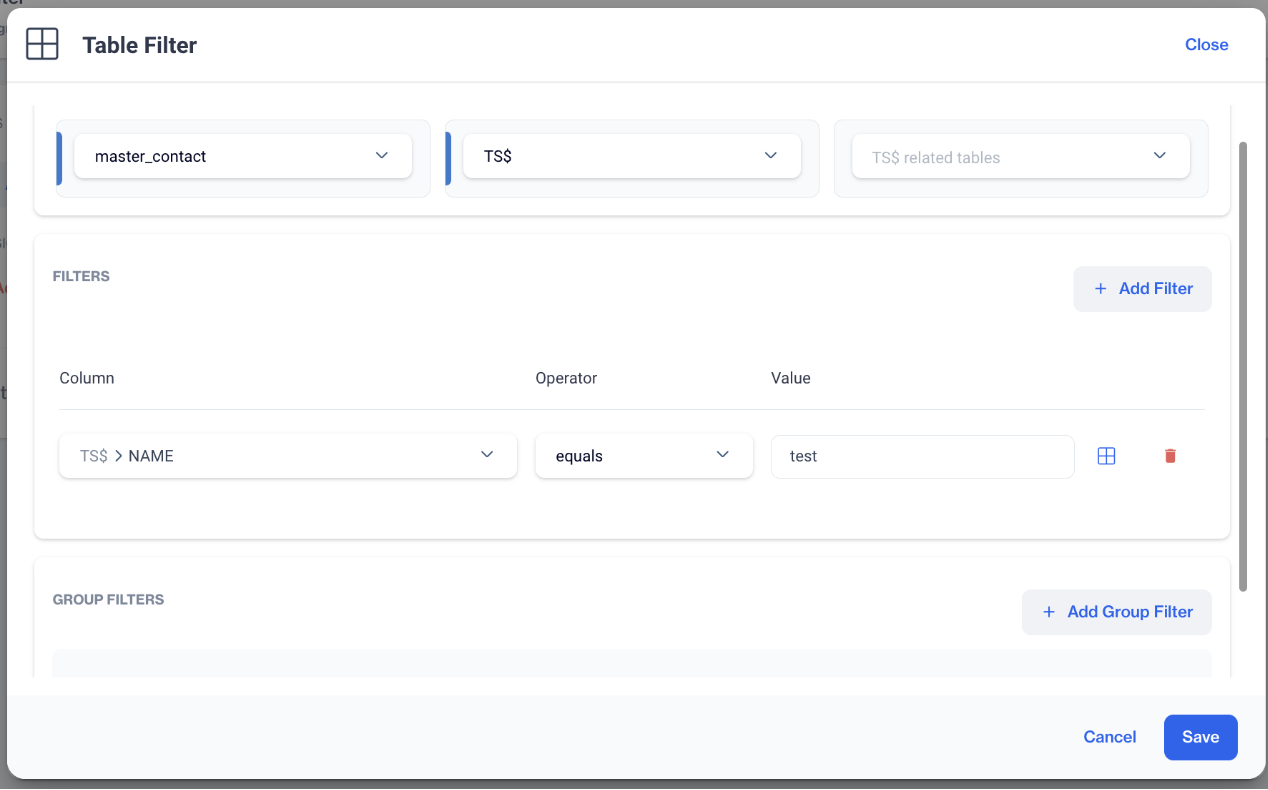
- In the Filters section, open the dropdown menu and choose Table Filter under Relational DB.
- Select the desired table from the available list.
- Click Add Filter to define the following:
- Column: Choose the column you want to filter.
- Operator: Select a condition, such as equals, contains, or greater than.
- Value: Enter the value to filter by.
- Once your filters are configured, click the Save button.
Prerequisites
- Oracle, RedShift, MsSql and Google BigQuery data sources can use this feature.
- Remote Source must be defined for utilizing the Remote Table on Interactive Segment.
- Remote Table must be defined before utilizing the data on Interactive Segment.