Basic Sticky Bar
The Basic Sticky Bar template is a straightforward option for displaying important messages or calls to action on your website. This template consists of a text area and a Call to Action (CTA) link.The sticky bar remains visible as users scroll through the page, ensuring maximum visibility and engagement with your message.
Creating a Basic Sticky Bar
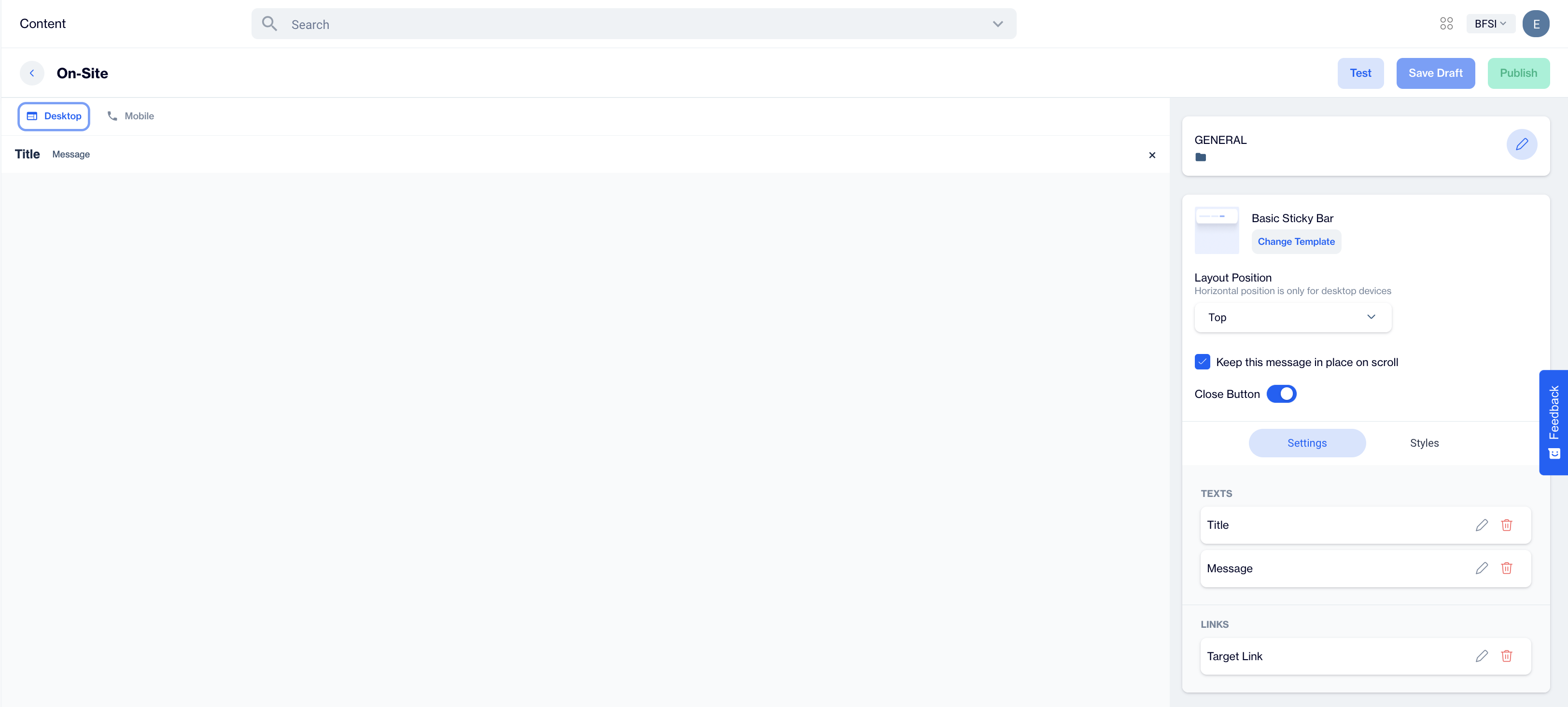
Basic Sticky Bar
Preview on Desktop or Mobile:
After selecting the Basic Sticky Bar template, you will see a preview on the left side of the screen. This shows how the sticky bar will appear on both desktop and mobile versions based on the content you add.
General Section
- Start by filling out the General section.
- Provide a Name for the sticky bar and choose the appropriate Folder where it will be saved.
- Once this information is completed, the Content section will become available for further customization.
Content Section
- Change Template:
Users can switch to a different template by clicking the Change Template button, offering flexibility if they want to modify the design.
- Layout Position:
From the dropdown menu, users can select the Layout Position of the sticky bar, choosing either Top or Bottom of the page.
Note: Horizontal position is only for desktop devices.
- Additional Options:
Keep this message in place on scroll: If enabled, the sticky bar will remain visible as the user scrolls down the page.
Close Button: Toggle on the Close Button option to allow users to dismiss the sticky bar.
Just below these options, you'll find the Settings and Styles sections for further customization.
Settings: Texts and Links
Texts:
- For both the Title and Message, click on the pencil icon next to each to edit the text.
- Use the Customization Selector to add personalized content based on the user's flow or real-time targeting campaigns.
- Once you've completed your edits, click the Save & Back button. The updated text will appear on the left side of the screen, allowing you to preview how it looks within the popup.
Links:
- In the Links section, you need to input the Source URL where the sticky bar's Call to Action (CTA) will direct users.
- If desired, you can enable the Open a New Tab option by toggling the button, so the link opens in a separate browser tab.
After clicking on the icon in the right corner, users need to click the Save & Back button to save their changes and return to the previous screen.
Styles
In the Styles section, users have the flexibility to customize the visual appearance of the sticky bar. Here, they can adjust key design elements, including:
- Fonts: Choose the font family and font URL to match brand or campaign aesthetics.
- Layout Customization: Modify the card radius and padding for a personalized look and feel.
- Colors: Set the background, close button, title, and message colors to align with your design preferences.
- Text Styling: Customize the font size and weight for both the title and message to ensure clarity and emphasis.
These options allow users to create a fully tailored sticky bar that suits both desktop and mobile displays.
After adding your content successfully, save it as a draft for future use or publish it to make it ready for your campaigns.
Related Articles
Image Bar
The Image Bar is a streamlined on-site element designed to display a single image, without any accompanying text or buttons. This feature allows users to showcase a visual element, such as a promotional banner or announcement, across the top or ...Applications
The Settings section in Dengage offers a variety of tools to manage and integrate different aspects of your account. One important feature is the ability to integrate applications within the platform. This functionality provides an overview of ...Custom Reports - Charts
All Reports The report list is displayed in a table format that includes: Name: The title of the report. Use clear and descriptive names to easily identify its purpose and content. Type: Specifies the report type, such as Pivot Table, Big Number, ...Inbox Preview
This feature allows to view in detail the created email in selected email clients. Overview Email Detailed Preview feature uses the 3rd party tool named ‘Email Preview Services’. This tool has its own preview generation principles that do not go hand ...Targeting On-site Campaign
Once your on-site content is successfully generated, you can make any necessary changes and save it as a draft for later use. If you’re ready to launch, publish the content to prepare it for your on-site campaigns. To create a campaign directly on ...