Monitoring
The Monitoring feature in the Campaign Configuration section includes several key attributes. Each attribute plays a specific role in tracking and managing errors and alerts.
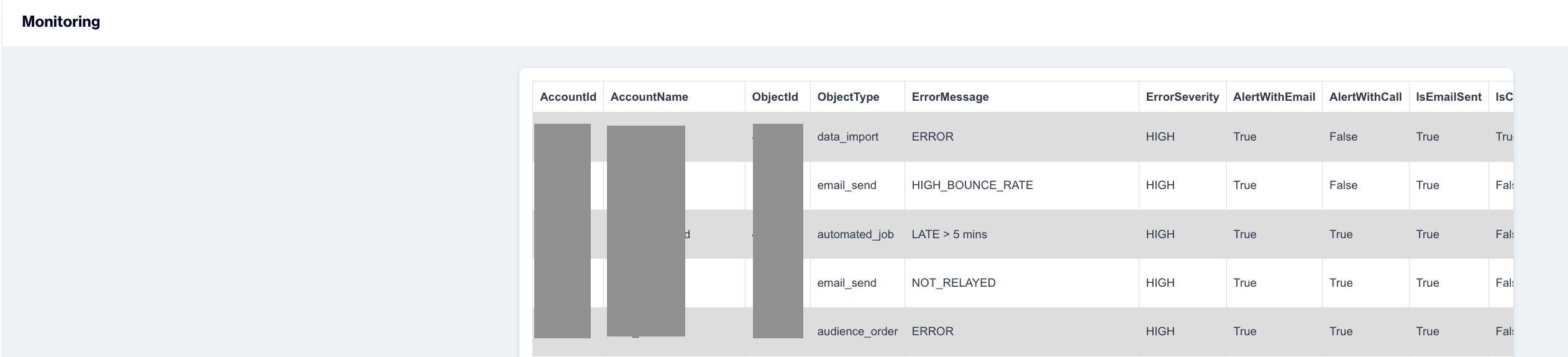
Monitoring
Below is a description of each object:
- AccountId: A unique identifier assigned to the account associated with the monitored campaign or object. This helps link the issue to a specific account.
- Account Name: The name of the account to which the campaign or object belongs.
- ObjectId: The unique identifier for the specific object being monitored, such as a campaign, message, or another relevant entity.
- ObjectType: Indicates the type of the monitored object. For example, it could represent a push send, or data export.
- Error Message: A description of the issue or problem encountered, providing insights into the cause of the error.
- Error Severity: Represents the level of urgency for the error. This prioritization ensures critical issues are addressed promptly.
- AlertWithEmail: Specifies whether an email alert has been configured for this error.
- AlertWithCall: Indicates whether a call alert has been set up for this error.
- Is Email Sent: Shows whether an email alert has been sent in response to the error.
- IsClientAlertSent: Indicates if a client-specific alert has been sent.
- IsCallSent: Reflects whether a call alert has been made to notify about the error.
- Created At: The date and time when the error was recorded, helping to track when the issue occurred.
- Object Date: The date associated with the monitored object. This could be the object's creation date, last modified date, or another relevant timestamp.
Related Articles
Automated Flows History
The Automated Flows History section provides a comprehensive history of automated flows, enabling users to track the execution and scheduling of these flows. This feature ensures easy access to past and upcoming flow runtimes for monitoring and ...Alert Email
Alert Email Alert emails notify you about issues or errors that may arise during campaign execution or data processing. These alerts ensure you stay informed and can promptly address any problems. Alert Email You can configure alert emails for the ...Email
Can we use the same sender domain with our former email provider? Yes, you can use the same sender domain that you were using with your former email provider. We just need to check your past 3 months events based on email data(openers, clickers, ...CM.com
Welcome to the world of WhatsApp Marketing Messages, an innovative addition to our platform designed to revolutionize your marketing efforts. With WhatsApp Marketing Messages, you gain the power to effortlessly connect with your audience on a whole ...Magento
Dengage now integrates seamlessly with Magento, the leading framework for e-commerce. This integration allows you to sync the following data from your Magento website to Dengage CDMP: Contacts Products Product variants Orders Order details Events ...