Remote Targets
Dengage Platform is capable of exporting data or audiences to external targets, which are referred to as Remote Targets within the platform.
Remote Targets refer to the external systems or platforms to which the Dengage platform can connect in order to output data. Clients are required to provide connection credentials for their respective platforms. This ensures that when needed, the Dengage Platform can establish a connection and transmit data to these designated Remote Targets.
Dengage Platform supports the following remote target types:
- FTP: Facilitates data transfers using the FTP protocol.
- Google BigQuery: Enables connections to Google BigQuery for data transfers.
- Microsoft SQL: Allows for data transfers to Microsoft SQL Server.
- Facebook Custom Audience: Connects to Facebook's Custom Audience for audience delivery.
- Google Customer Match: Enables audience delivery to Google Customer Match.
- Salesforce: Connects to Salesforce Sales Automation for sending audiences to a list.
- Turkticaret.net: Facilitates data transfers to Turkticaret.net services.
- Turk Telekom: Enables data transfers to Turk Telekom.
- AdMatic: Connects to AdMatic for audience delivery.
- Web API: Facilitates data transfers to a specified Web API.
- AWS S3: Enables data transfers to Amazon S3.
- Oracle: Allows for data transfers to an Oracle database.
- TikTok: Connects to TikTok Ads Manager for audience delivery.
- Amazon Redshift: Facilitates data transfers to Amazon Redshift.
- Kafka: Integrates with Apache Kafka for data sending.
Data Export
Before you can export any data from the platform, you must first define a "Remote Target," which serves as the export destination within the platform. If you do not set up Remote Targets, your only option will be to directly export files to your computer.
How to Add a Remote Target
Before transmitting any data or audience to a platform or database from the Dengage Platform, you must supply the necessary credentials for the target destination.
In Dengage's settings section, the Remote Target Option enables users to add and manage remote targets for data integration and export. It includes the following components:
Overview Section
- Name: Displays the name of the remote target.
- Type: Indicates the type of remote target, such as FTP, Google BigQuery, among others.
- Update Date: Shows the date on which the remote target was last updated.
+Add: By clicking the "+ Add" button, users can introduce a new remote target. This action opens up a set of options to configure the new remote target.
- Name: Specify a name for the new remote target.
- Type: Choose from a list of available remote target types, which include:
- FTP: For data transfers using the FTP protocol.
- Google BigQuery: For integration with Google BigQuery.
- Microsoft SQL: For connecting to Microsoft SQL Server.
- Facebook Custom Audience: For integration with Facebook's custom audience feature.
- Google Customer Match: For integration with Google Customer Match.
- Salesforce: For CRM integrations with Salesforce.
- Turkticaret.net: For data exchanges with Turkticaret.net services.
- Turk Telekom: For data integrations with Turk Telekom.
- AdMatic: For audience delivery with AdMatic.
- Web API: For data exchanges through a Web API.
- AWS S3: For data storage and transfer with Amazon S3.
- Oracle: For connecting to Oracle databases.
- TikTok: For services integration with TikTok.
- Amazon Redshift: For data warehousing with Amazon Redshift.
- Kafka: For data streaming with Apache Kafka.
After setting the name and type for the remote target, finalize the setup by clicking the "Save" button. This action saves the new or updated remote target settings, integrating them into the platform's data export and integration framework.
Types of Remote Targets
This section provides guidance on how to define various Remote Targets within Dengage Platform.
FTP
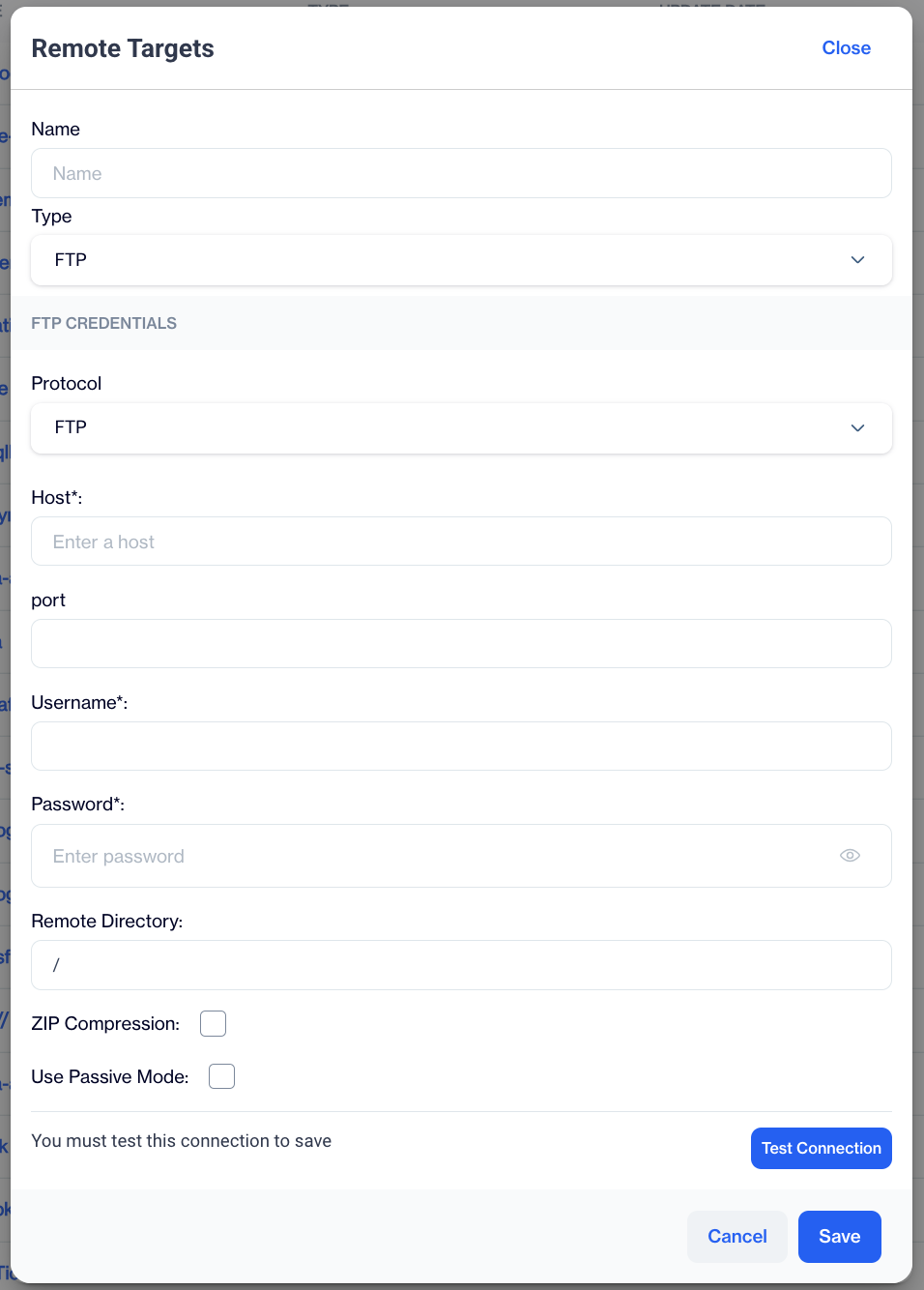
This remote target type is designed to facilitate connections to an FTP site.
FTP
When configuring the FTP type in Dengage's Remote Target creation, additional details are required to set up the FTP connection properly. Here's how to complete the FTP information section:
FTP Information
- Protocol: Select the FTP protocol to use for the connection.
- FTP: Standard File Transfer Protocol.
- SFTP: Secure File Transfer Protocol.
- FTPS: FTP Secure, which is FTP with TLS/SSL encryption.
- Host: Enter the hostname or IP address of the FTP server.
- Port: Specify the port number for the FTP connection (the default port for FTP is 21, but different ports may be used for SFTP or FTPS).
- Username: Enter your Dengage ID, which is typically your email address.
- Password: Enter your Dengage account password.
- Remote Directory: Specify the path of the remote directory on the FTP server where files should be transferred.
- Zip Compression: Enable this option if you wish to compress files using ZIP before transfer.
- Use Passive Mode: Enable this option if you prefer to use passive mode for the FTP connection to accommodate specific network configurations.
Test Connection: Use this button to verify the FTP settings by attempting a connection with the provided details to ensure everything is configured correctly.
Google BigQuery
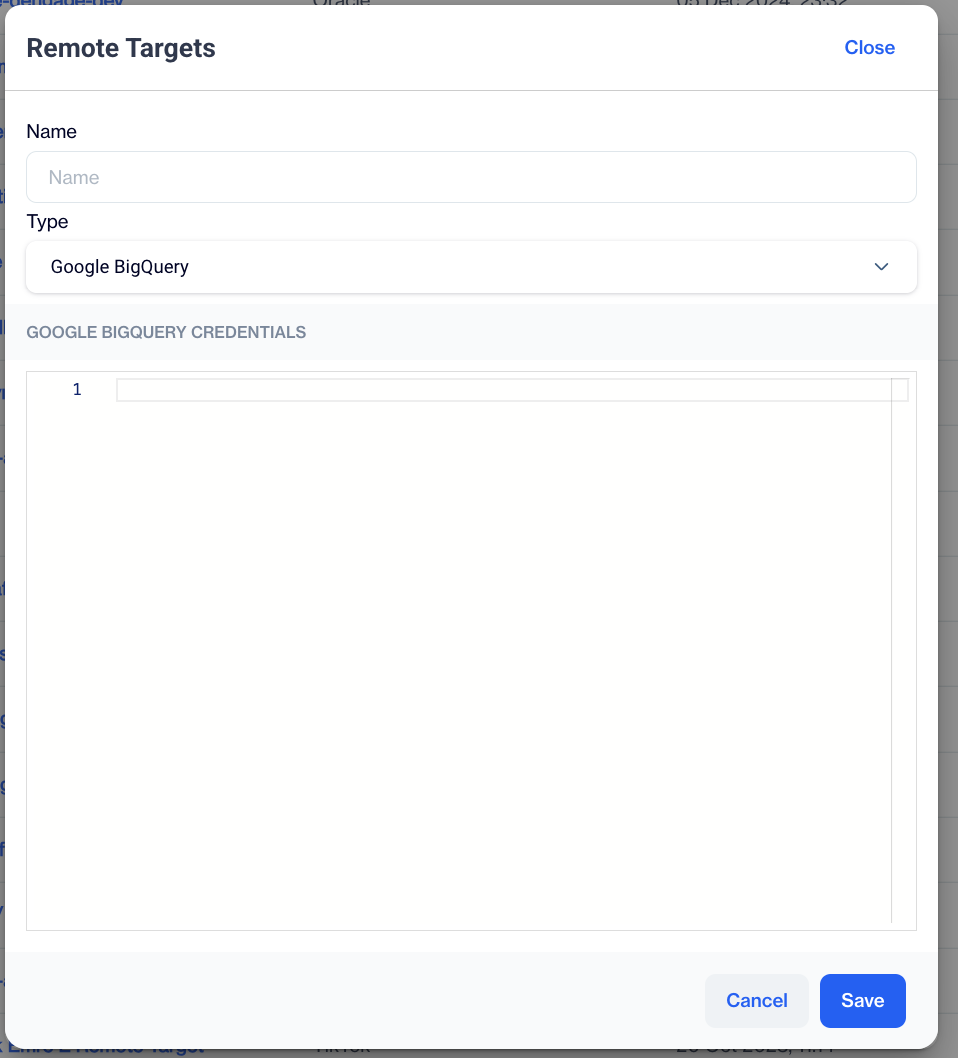
This remote target type is designed to facilitate connections to an Google Big Query site.
Google BigQuery
Google BigQuery Credentials: Please copy and paste Google Big Query credentials in Json text.
Microsoft SQL
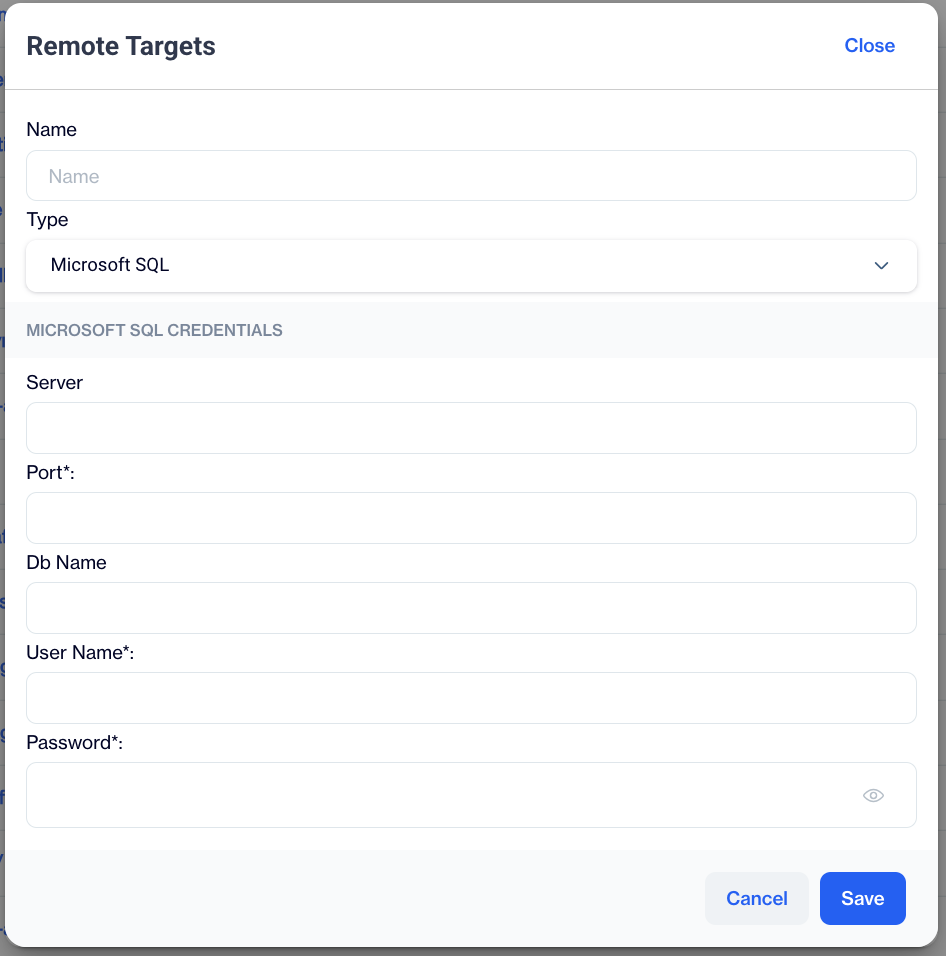
This remote target type is designed to facilitate connections to a Microsoft SQL Server site. This can be used for Azure Data Warehouse connection as well.
Microsoft SQL
When selecting Microsoft SQL as a remote target in Dengage's settings, a section labelled Microsoft SQL Credentials will appear to guide you through the configuration process:
Microsoft SQL Credentials
- Server: Enter the name or IP address of the Microsoft SQL server to which you wish to connect.
- Port: Specify the port number for the connection. The default port for Microsoft SQL Server is typically 1433.
- Database Name: Input the name of the database you aim to access on the server.
- Username: Provide the username required to authenticate with the SQL server.
- Password: Enter the password associated with the username to ensure secure access to the SQL server.
Facebook Custom Audience
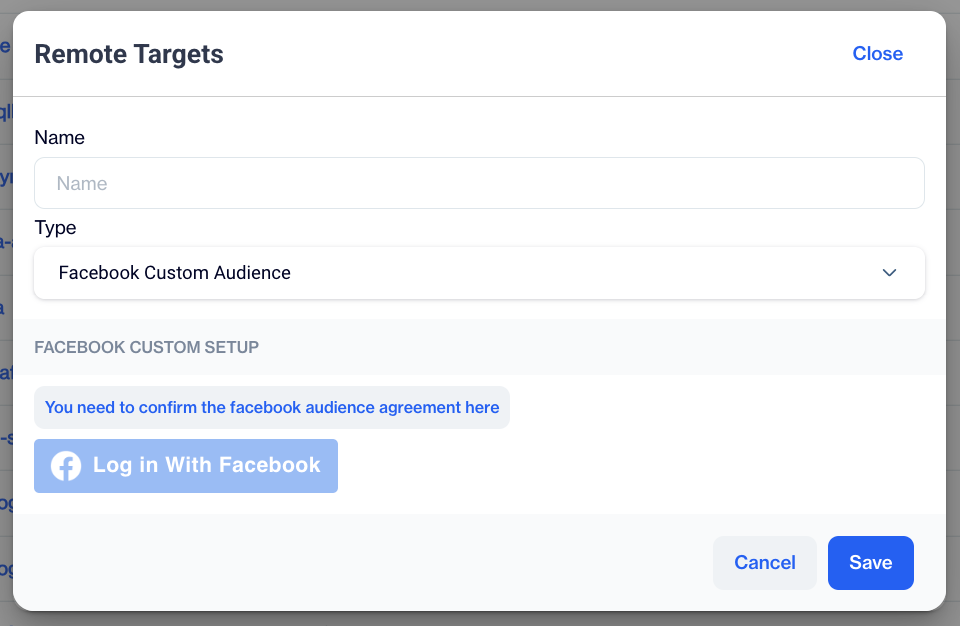
This remote target type is specifically designed to export segmented audiences to a client's Facebook Custom Audience platform.
Facebook Custom Audience
When selecting Facebook Custom Audience as a remote target in Dengage's Remote Target Creation, you will be provided with an interface.
Facebook Setup: This option will setup a connection between your account and your Facebook account to enable Dengage Platform to export selected audiences to your Facebook Custom Audience account.
- Log In with Facebook: This option allows you to authenticate and connect to your Facebook account. By clicking this button, you can log in using your Facebook credentials to establish a connection between Dengage and your Facebook Custom Audience.
- Confirm the Facebook Audience Agreement
You must confirm the Facebook Audience Agreement in this section. This is a mandatory step to proceed with Facebook Custom Audience. By agreeing, you ensure compliance with Facebook's policies and terms for audience management and data handling. Make sure to review and confirm the agreement before proceeding.
Google Customer Match
This remote target type is specifically designed to export segmented audiences to a client's Google Customer Match platform.
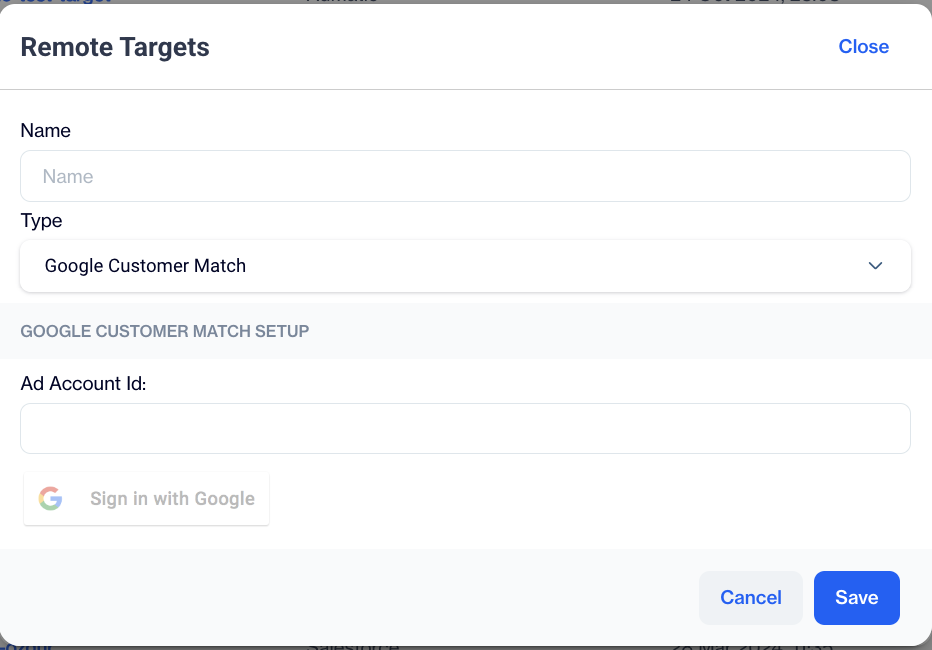
Google Customer Match
When selecting Google Customer Match as a remote target in Dengage's Remote Target Creation, an interface labeled Google Customer Match Setup will appear, facilitating the setup of a connection between your Dengage account and your Google account. This connection enables the Dengage Platform to export selected audiences directly to your Google Customer Match platform.
- Ad Account Id: Enter your Ad Account ID to authenticate the connection. This is a unique identifier associated with your Google Ads account.
- Sign In with Google: Click this button to authenticate and connect your Google account. By using this option, you can log in with your Google credentials, establishing a secure link between Dengage and your Google Custom Audience.
Sign in with your Google account
You must sign in with your Google account and follow the steps to connect your Google Customer Match account to Dengage Platform.
Salesforce
This remote target type is specifically designed to sync segmented audiences to a client's Salesforce Sales Automation lists.
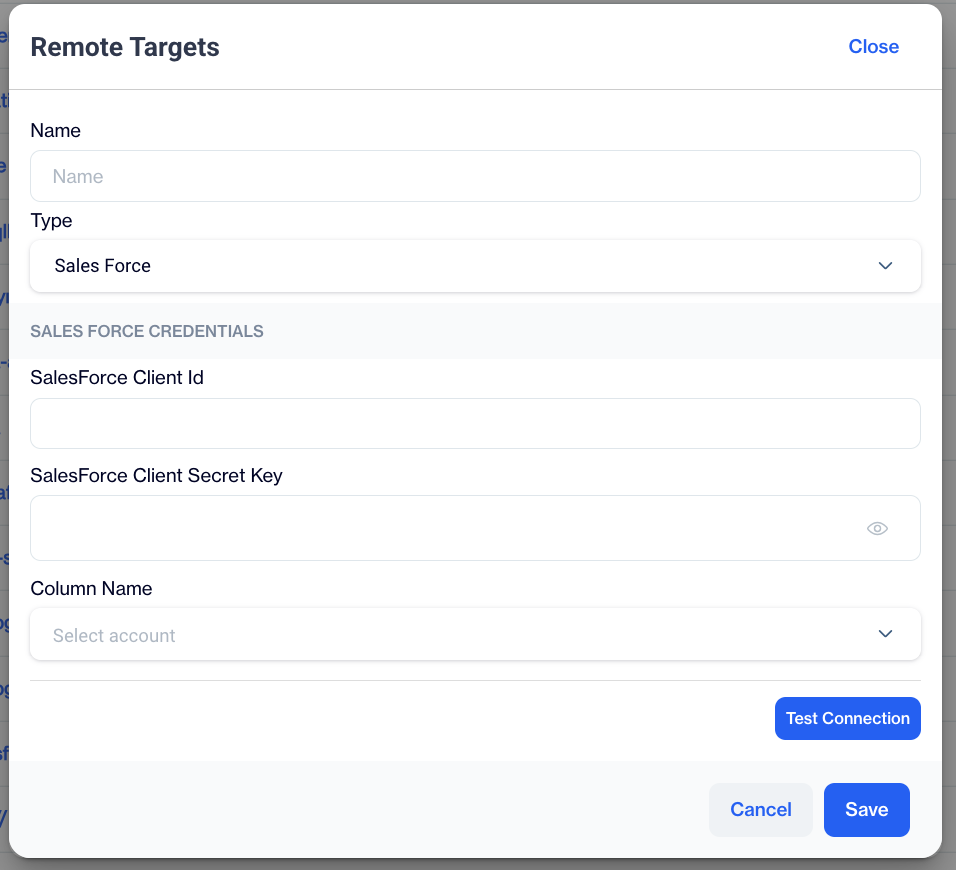
Salesforce
If a user selects the Salesforce section, an interface titled "SALES FORCE INFORMATIONS" will be presented. This interface provides fields for entering necessary credentials and configuring settings to establish a connection with their Salesforce account.
Salesforce Credentials
- Salesforce Client Id: Enter your Salesforce client ID to authenticate the connection. This is a unique identifier associated with your Salesforce application.
- Salesforce Client Secret Key: Input your Salesforce client secret key here. It is a secure key used for authenticating the connection and gaining access to Salesforce data.
- Column Name: Specify the name of the column you wish to export or use in the Salesforce integration.
Test Connection: Once the necessary credentials and settings are entered, you can test the connection to ensure that the information provided is accurate and that a successful connection to Salesforce can be established. This step is crucial for ensuring a smooth data transfer and integration process.
Turkticaret.net
This remote target type is specifically designed to sync segmented audiences with Turkticaret.net services.
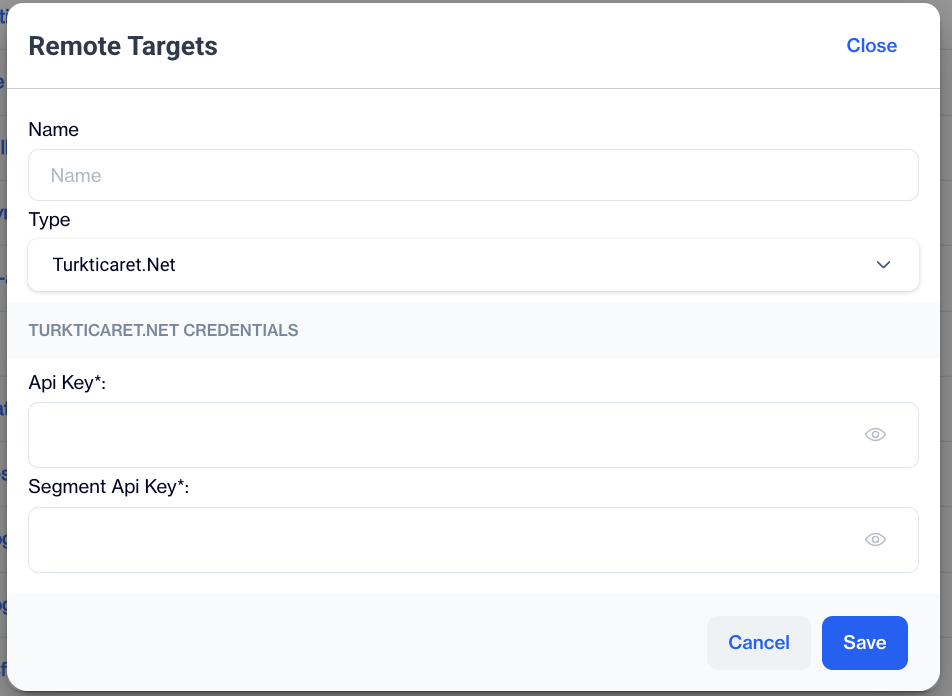
Turkticaret.net
Turkticaret.net Credentials
- API Key*: Enter your Turkticaret.net API Key to authenticate the connection. This unique key allows secure access to the Turkticaret.net services.
- Segment API Key*: Provide your Segment API Key here to enable seamless data synchronization for segmented audiences.
Turk Telekom
This remote target type is specifically designed to sync segmented audiences with Turk Telekom services.
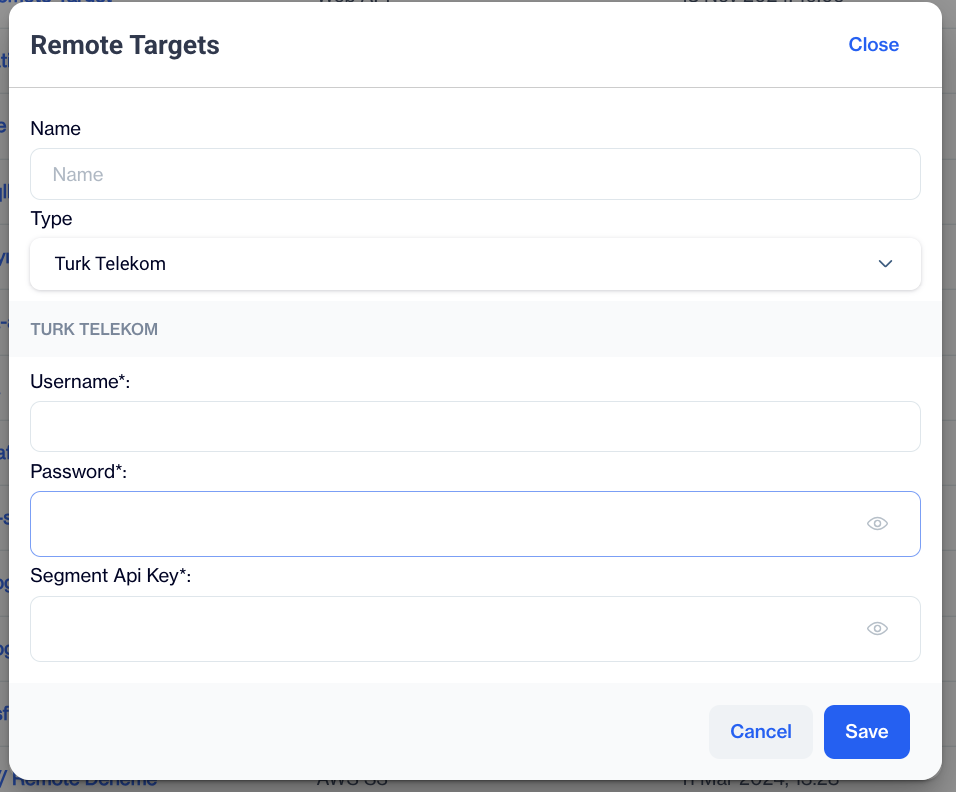
Turk Telekom
Turk Telekom Credentials
- Username*: Enter the username associated with your Turk Telekom account to authenticate the connection.
- Mail Address: Provide the email address linked to your Turk Telekom account for verification and communication purposes.
- Password*: Input the password associated with your Turk Telekom account to ensure secure access.
- Segment API Key*: Enter your Segment API Key to enable seamless data synchronization for segmented audiences.
AdMatic
This remote target type is specifically designed to sync segmented audiences with AdMatic's platform.
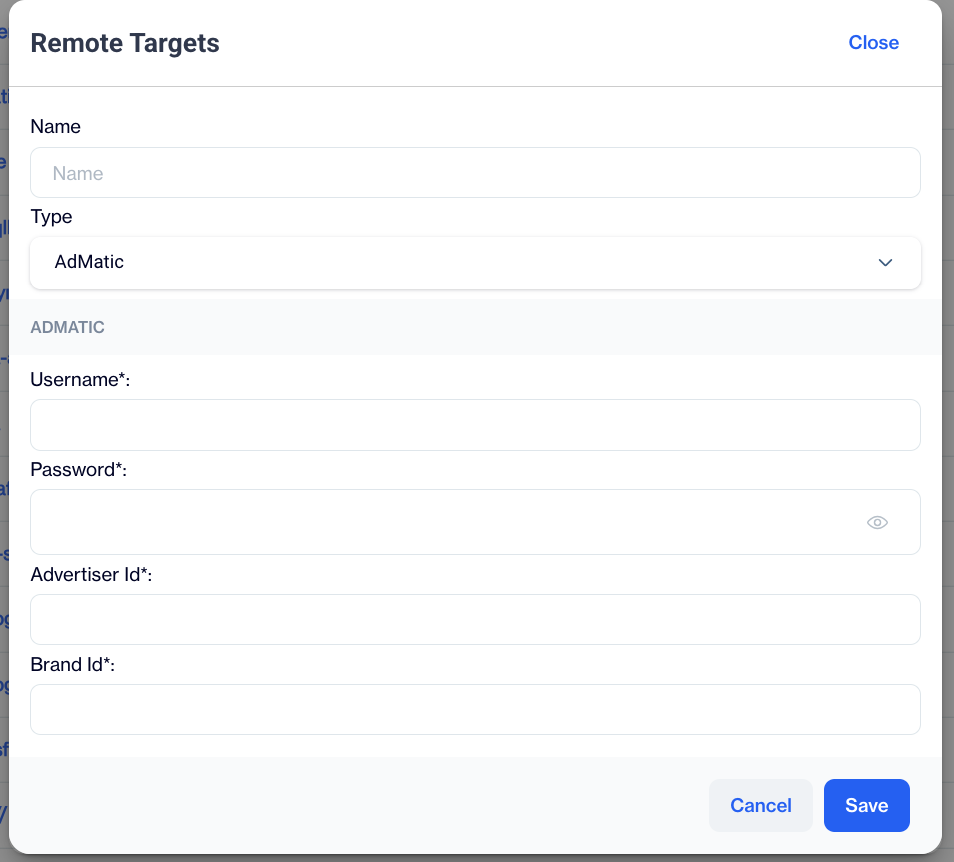
AdMatic
AdMatic Credentials
- Username*: Enter the username associated with your AdMatic account to authenticate the connection.
- Password*: Input the password linked to your AdMatic account to ensure secure access.
- Advertiser ID*: Provide the Advertiser ID to identify your account within AdMatic's system.
- Brand ID*: Enter the Brand ID associated with the advertiser to enable precise audience targeting and synchronization.
WEB API
This remote target type is specifically designed to facilitate the transfer of audience data to a client's custom-developed WEB API. Essentially, clients can configure the Dengage Platform to send their own audiences directly by having the platform invoke their custom APIs. This allows for seamless integration and personalized data handling based on the client's specific requirements.
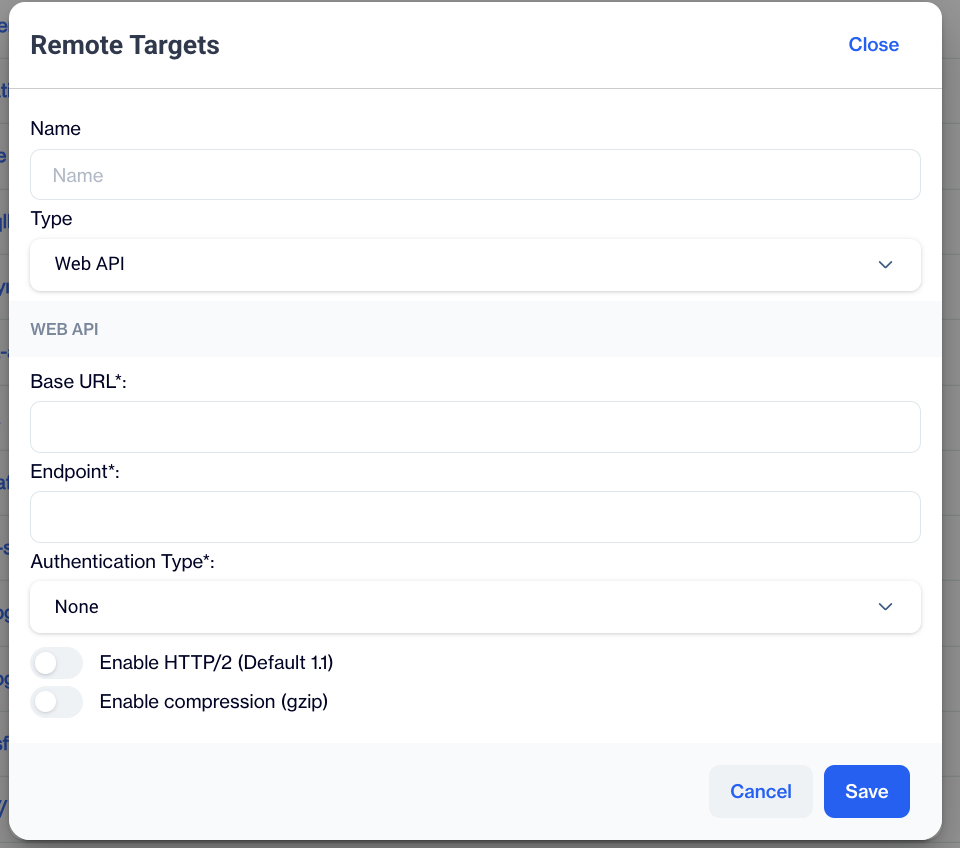
WEB API
Here are the details for configuring your web API's connection settings in Dengage's Remote Target options:
- Base URL: Specify the base URL of your web API here. This URL forms the foundation for all API calls.
- Endpoint: Enter the specific endpoint URL here. An endpoint URL points to a particular controller or function within your web API.
- Authentication Type: Choose the type of authentication your web API will use. The options are:
- None: This is the default setting, where no authentication is required.
- Basic: Selecting basic authentication requires additional information to secure the connection.
- Enable HTTP/2: Toggle this to enable HTTP/2, the updated version of the HTTP protocol that offers enhanced performance.
- Enable Compression (gzip): Enable this option to compress data transmitted between the web API and the client, effectively reducing bandwidth usage.
AWS S3
This remote target type is specifically designed to export data to Amazon S3 service.
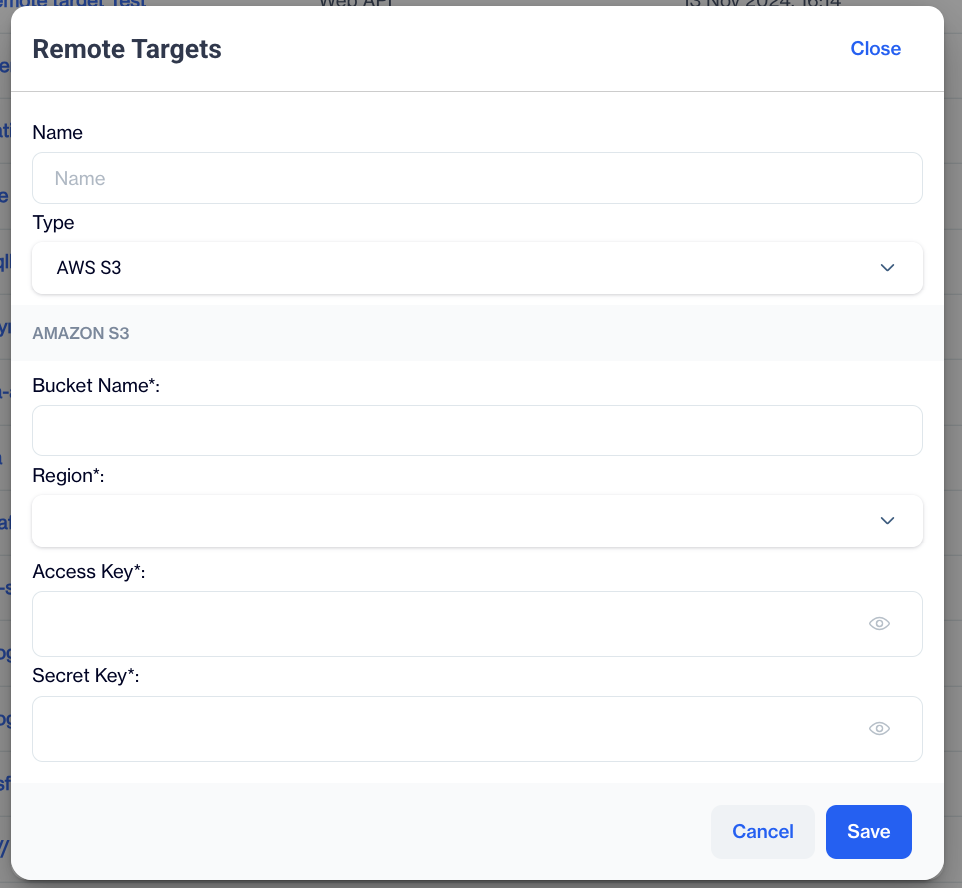
AWS S3
When configuring an Amazon S3 remote target within Dengage, the following fields are required:
- Bucket Name: Enter the name of the bucket where you intend to store your files. In Amazon S3, a bucket functions like a folder that can hold multiple objects (files).
- Region: Select the AWS region where your S3 bucket is located or where you plan to create it.
- Access Key: Input your AWS access key. This is a unique identifier used by Amazon S3 to authenticate your requests.
- Secret Key: Enter your AWS secret key, which is used in conjunction with the access key to securely authenticate requests to Amazon S3.
Oracle
This remote target type is designed to facilitate connections to an Oracle database site.
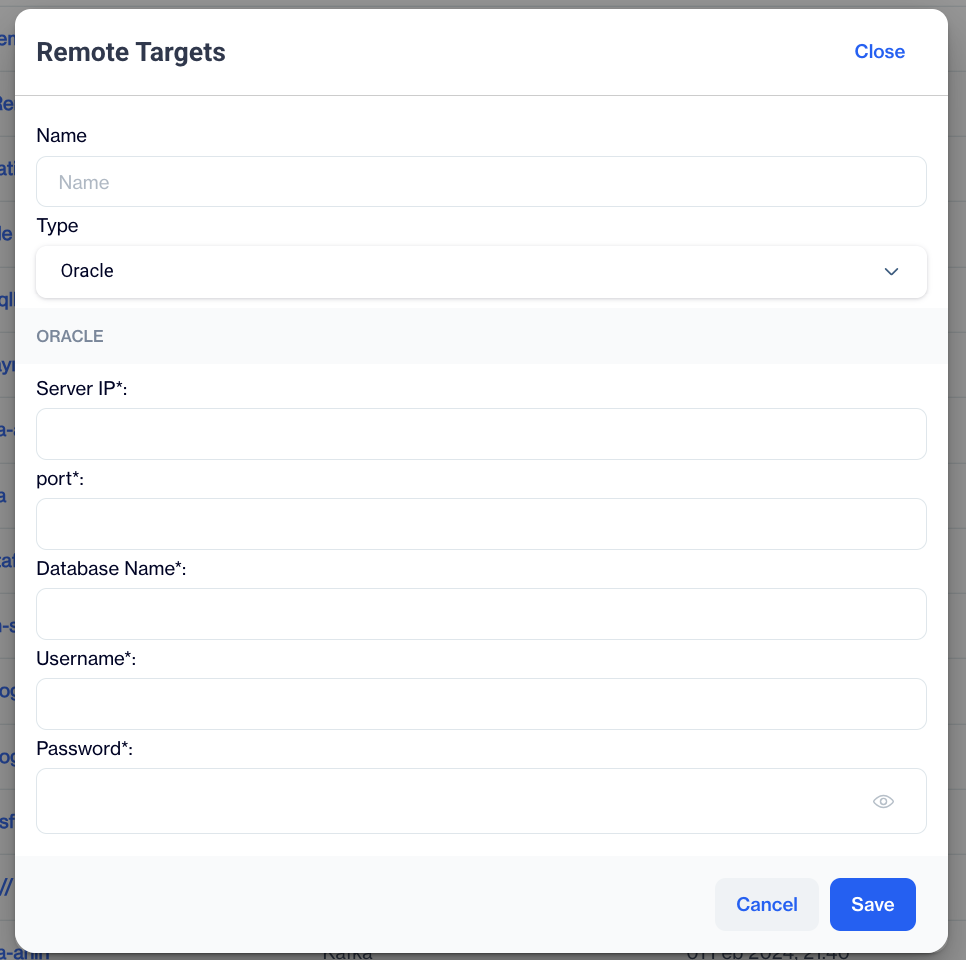
Oracle
When setting up a database connection, you will need to provide the following information:
- Server IP: Enter the IP address of the database server. This is the specific address that your computer will use to establish a connection with the database management system.
- Port: Specify the port number on which the database server is listening.
- Database Name: Enter the name of the database to which you wish to connect.
- Username: Provide the username associated with the database account you will use for the connection.
- Password: Input the password for the database account to secure the connection.
TikTok
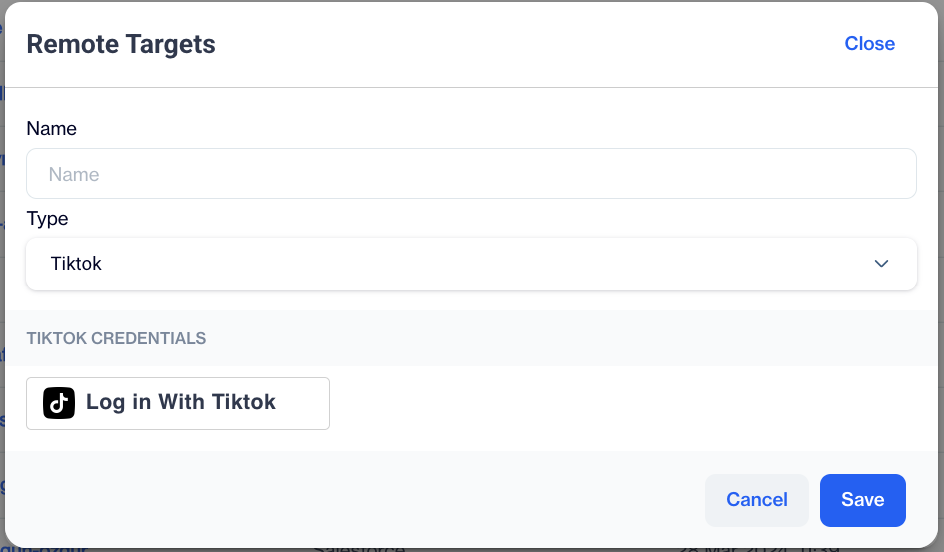
This remote target type is specifically designed to export segmented audiences to a client's Tiktok Ads account.
TikTok
Log In with TikTok: This feature enables you to authenticate and connect to your TikTok account. By clicking this button, you can log in using your TikTok credentials, thereby establishing a connection between Dengage and your TikTok Ads account.
Amazon Redshift
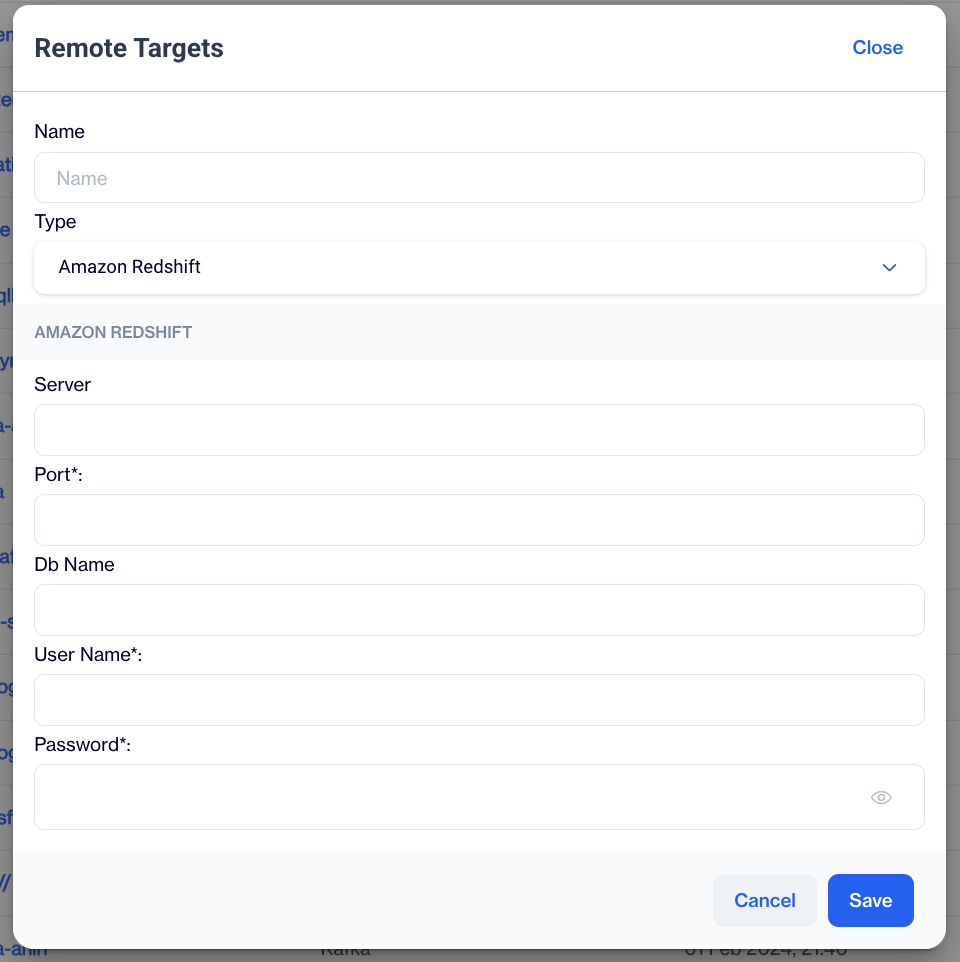
This remote target type is specifically designed to facilitate data transfers to an Amazon Redshift data warehouse.
Amazon Redshift
Amazon Redshift Credentials
- Server: Enter the server name or IP address of your Amazon Redshift cluster to establish the connection.
- Port*: Specify the port number used to connect to the Amazon Redshift cluster. The default port for Redshift is typically 5439.
- DB Name: Provide the name of the database you wish to access within your Amazon Redshift cluster.
- Username*: Enter the username associated with your Amazon Redshift account to authenticate the connection.
- Password*: Input the password linked to your Amazon Redshift username to ensure secure access.
Kafka
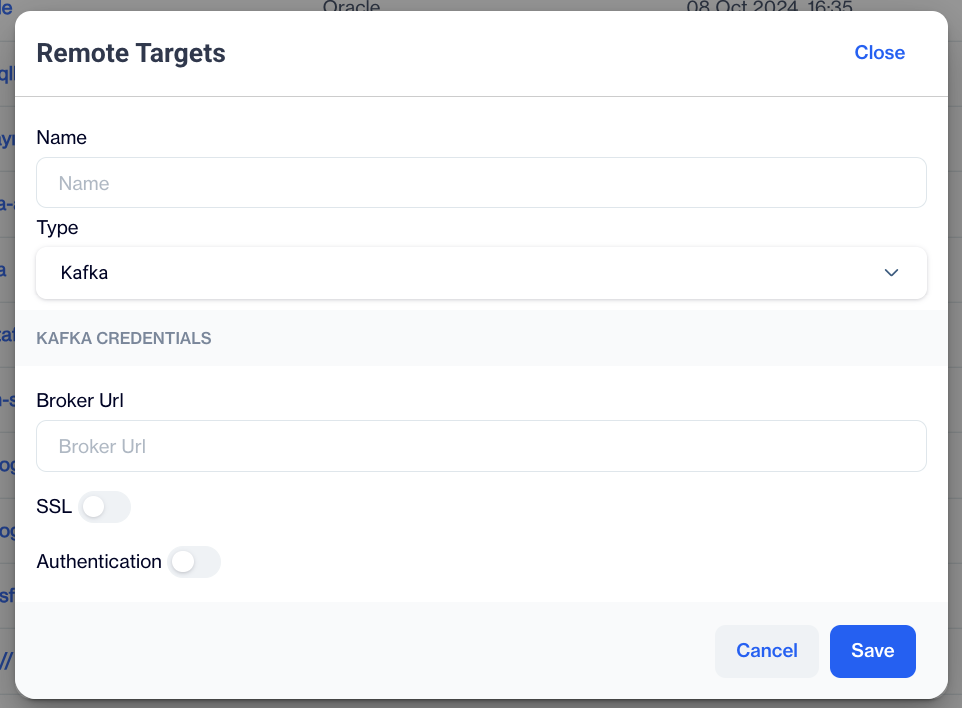
This remote target type is designed to facilitate connections to a Kafka queue.
Kafka
Broker Url: The url of Kafka broker.
SSL: If SSL is used or not. When checking you need to provide the certificate as follows.
Authentication: If Authentication is required, please check this box. Username, passwords and SASL Type must be provided to connect to Kafka as below.
MySQL via ODBC
Defining ODBC for MySQL
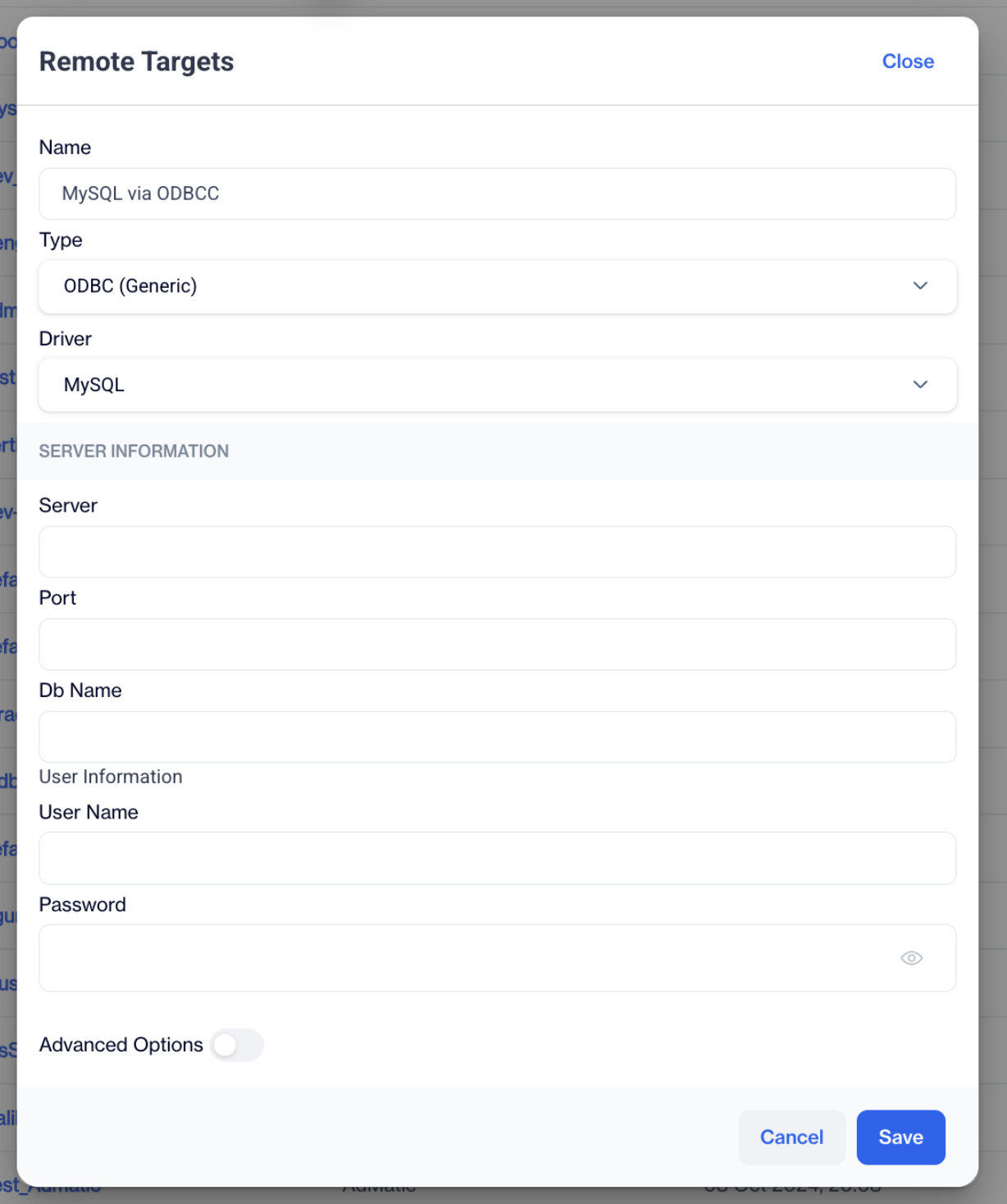
To export data to MySQL, you must first define it as an ODBC Remote Target.
- Navigate to Remote Targets:
Settings > Integrations > Remote Targets - Add a New Remote Target:
Click Add to open the configuration window.
- Enter Remote Target Details:
- Name: Enter a recognizable name (e.g., MySQL_Export).
- Type: Select ODBC.
- Driver: Choose the appropriate MySQL ODBC driver.
- Provide the necessary server information and user information.
- Save:
Click Save to register the connection.
My SQL via ODBC
Related Articles
Remote Sources
Dengage Platform is capable of importing data or creating segments and audiences from external sources, which are referred to as Remote Sources within the platform. The Dengage Platform is equipped to import data and create segments and audiences ...Adding ODBC as Remote Target to Data Export
The ODBC Data Export feature allows users to export data directly to an ODBC database from the Automated Flow module. Depending on the availability of SELECT permissions on the customer’s ODBC server, users can either select a schema/table from a ...Adding PostgreSQL as Remote Target to Data Export
The PostgreSQL Data Export feature allows users to export data directly to a PostgreSQL database from the Automated Flow module. Depending on the availability of SELECT permissions on the customer’s PostgreSQL server, users can either select a ...Exporting Incremental Logs to Databases via Remote Target
With this update, database export capability in the Automated Flow module has been enhanced. You can now export Incremental Logs directly to supported databases such as MySQL and others via Remote Target integration. Prerequisites A Remote Target ...Remote Segment
Can I connect my MS Sql database with my tables in D-engage? Yes ✔️ , you may connect your MS Sql database with the tables in Dengage via remote source connectivity. This will enable you to send as much data from your my Sql database to dengage ...