Revenue Mapping
The Revenue Mapping feature is essential for tracking and reporting the revenue generated by your campaigns. By configuring this feature, you ensure precise financial analysis and maximize the impact of your advertising efforts. Revenue Mapping allows you to standardize revenue data and attribute it to specific campaigns.
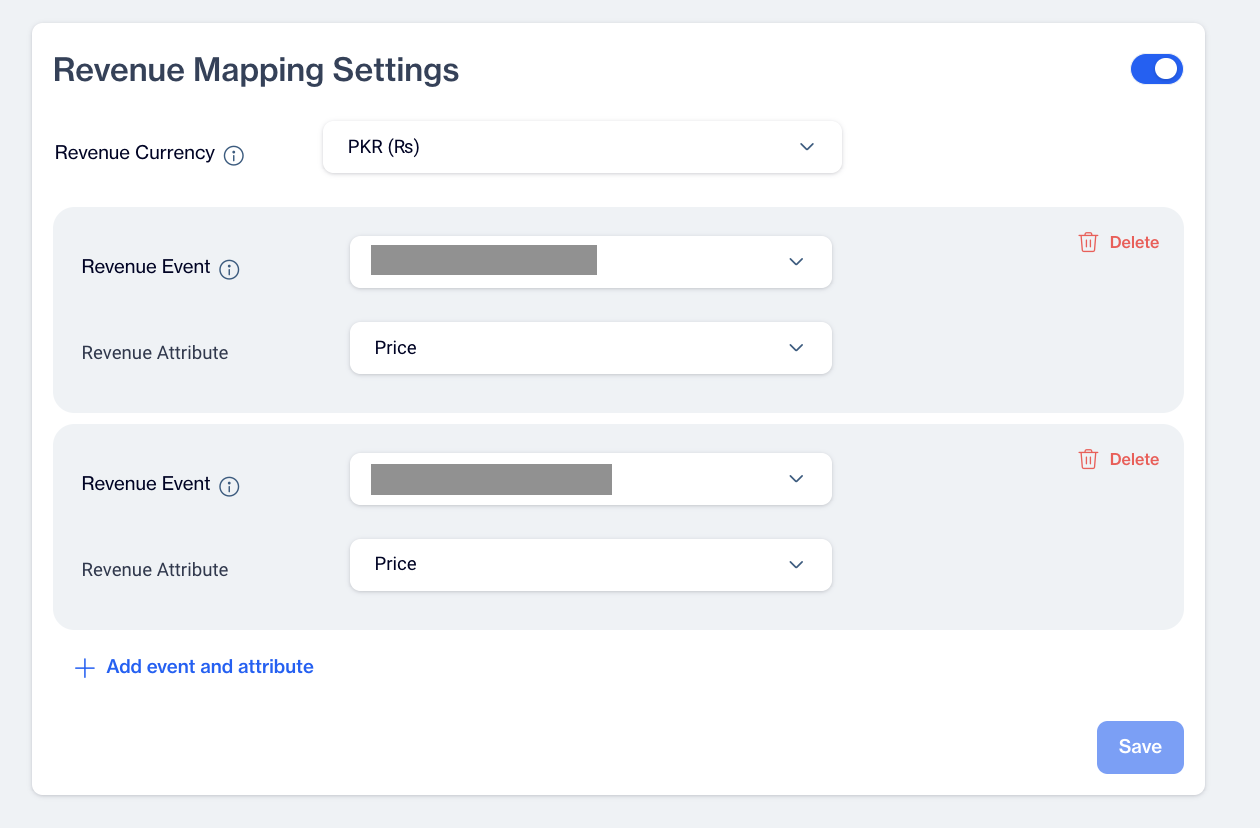
Revenue Mapping
How to Configure Revenue Mapping
- Set Revenue Currency
- Specify the currency in which all revenue metrics will be reported.
- This ensures uniform financial reporting across dashboards and reports.
- Understanding Revenue Events
- Identify the Revenue Events that track the impact of your campaigns on revenue generation.
- Define your Conversion Event as the Order Event to monitor transactions directly influenced by campaigns.
- Revenue Attribute
- The Revenue Attribute in the Revenue Mapping feature is predefined as Price. This attribute represents the monetary value of transactions and is automatically used to track and report revenue.
Click the Save button to finalize your settings. Saving ensures that revenue data is accurately tracked and integrated into the campaign’s reports.
Related Articles
Multiple Event Structure for Conversion Tracking and Revenue Mapping
The Multiple Event Structure feature allows you to select multiple events for tracking conversions and mapping revenue. By choosing these events, you can view each event's impact separately in your reports, offering clearer insights into your ...Whatsapp Business API
Dengage now supports direct integration with the WhatsApp Business API. Users can seamlessly set up and manage their WhatsApp messaging without relying on third-party providers. Once the integration is configured via Settings > Integrations > 3rd ...Custom Reports - Charts
All Reports The report list is displayed in a table format that includes: Name: The title of the report. Use clear and descriptive names to easily identify its purpose and content. Type: Specifies the report type, such as Pivot Table, Big Number, ...MSSQL Data Export
The MSSQL Data Export Node allows users to export data directly to an MSSQL database from the Automated Flow module. Depending on the availability of SELECT permissions on the customer's SQL server, users can either select a schema/table from a ...RFM Analysis
The Analysis module aims to help businesses understand customer behavior, identify high-value segments, and optimize engagement strategies. By leveraging RFM (Recency, Frequency, and Monetary) scoring, the module enables data-driven decision-making, ...