Time Categories by Channel
The Time Categories by Channel feature allows you to define specific time intervals for different communication channels. This helps you customize the timing of your messages to suit your audience's preferences for each channel, such as Email, Mobile Push, Web Push, and SMS/MMS.
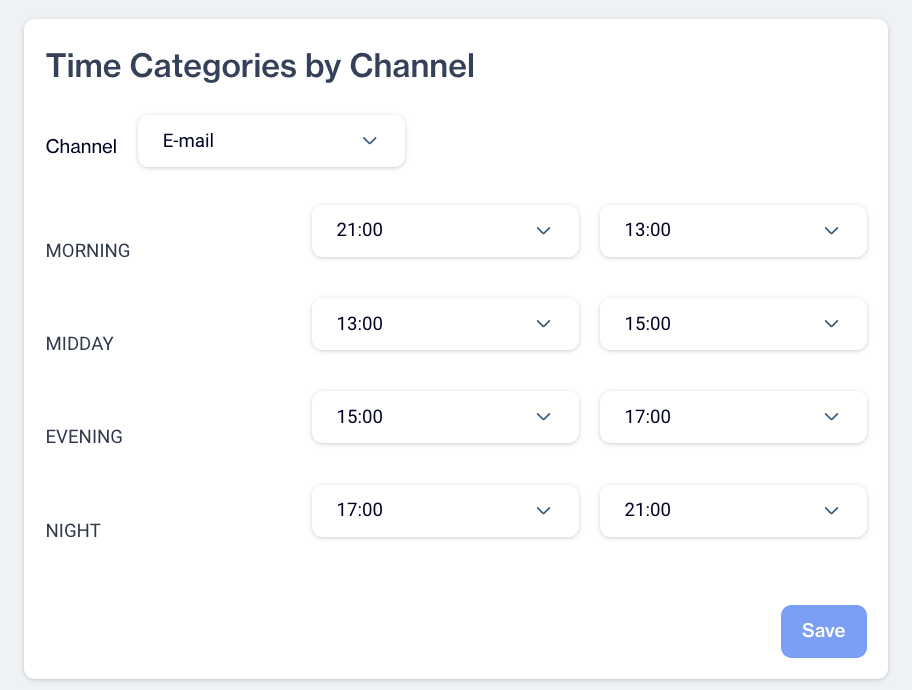
Time Categories by Channel
At the top of the screen, a Channel dropdown menu lets you select one of the following communication channels:
- Mobile Push
- Web Push
- SMS/MMS
Below the dropdown menu, you’ll find four time categories:
- Morning
- Midday
- Evening
- Night
Each category includes two dropdown menus to specify the start and end times for the interval. To define these intervals, simply select the desired start and end times from the dropdowns for each category.
Related Articles
Email Channel Report
The Channel Report page helps you track and analyze the performance of your email campaigns. Follow the steps below to access and navigate the report. 1: Access the Channel Report Go to the Analytics section on the main page. Click Report > Flow > ...Onsite Channel Report
The Channel Report page helps you track and analyze the performance of your on-site campaigns. Follow the steps below to access and navigate the report. 1: Access the Channel Report Go to the Analytics section on the main page. Click Report > Flow > ...In-App Channel Report
The Channel Report page helps you track and analyze the performance of your In-App campaigns. Follow the steps below to access and navigate the report. 1: Access the Channel Report Go to the Analytics section on the main page. Click Report > Flow > ...SMS Channel Report
The Channel Report page helps you track and analyze the performance of your SMS campaigns. Follow the steps below to access and navigate the report. 1: Access the Channel Report Go to the Analytics section on the main page. Click Report > Flow > ...Push Channel Report
The Channel Report page helps you track and analyze the performance of your push campaigns. Follow the steps below to access and navigate the report. 1: Access the Channel Report Go to the Analytics section on the main page. Click Report > Flow > ...