Alerts
Alerts Descriptions:
Import Not Completed Alert
An "Import Not Completed Alert" is a notification indicating that an attempt to import data into CXDP was unsuccessful. This alert is typically triggered when there are issues that prevent the data from being fully or correctly imported.
Export Not Completed Alert
An "Export Not Completed Alert" is a notification indicating that an attempt to export data from CXDP was unsuccessful. This alert is typically triggered when there are issues that prevent the data from being fully or correctly exported.
Automated Flow Not Completed Alert
An "Automated Flow Not Completed Alert" is a notification indicating that a specific automated flow did not successfully complete.
Campaign flow not complete
A "Campaign Flow Not Complete Alert" is a notification indicating that a campaign did not successfully complete.
Important:No Audience in Recurring Campaign Alert:
This alert does not indicate an issue but rather specifies that a particular campaign currently has an audience size of zero.
To avoid receiving alerts about the "No Audience in the Recurring Campaign," leave the email section empty.
How To Manage Alerts from CXDP?
Navigate to Settings ➡️Campaign Configurations ➡️ Alert Emails.
Here, you can enable the specific alerts you wish to receive and specify the email address for these notifications.
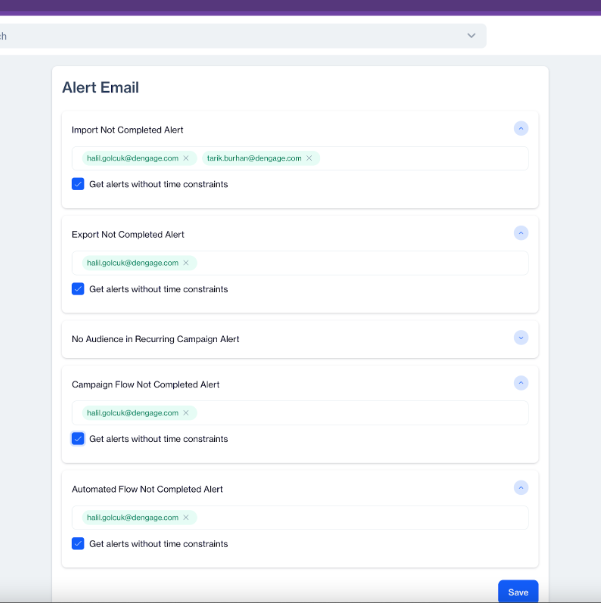
What does "Get Alerts without time constraints" mean?
When this option is enabled, we will receive alerts 24/7. If it is disabled, we need to set specific intervals for receiving email notifications about any issues.

Related Articles
Alert Email
Alert Email Alert emails notify you about issues or errors that may arise during campaign execution or data processing. These alerts ensure you stay informed and can promptly address any problems. Alert Email You can configure alert emails for the ...Transactional
The Transactional module provides a comprehensive suite for managing real-time communication across multiple channels, including Email, SMS, and Push notifications. This module allows users to create, send, and track personalized transactional ...Monitoring
The Monitoring feature in the Campaign Configuration section includes several key attributes. Each attribute plays a specific role in tracking and managing errors and alerts. Monitoring Below is a description of each object: AccountId: A unique ...Coupons
The Coupons feature allows you to create and manage reusable coupon lists that can later be used across campaigns, such as email, SMS, or push. Each coupon list acts as a container for coupon codes, making it easier to track usage, monitor ...Contacts
How can I check if a device/contact did not receive the sent message? To check if a device/contact did not receive a sent message, you can use Channel Reports and Campaign Reports, Delivery Status Codes, Bounce Analysis, Unsubscribe Lists, ...