Custom API Endpoints
The Custom API Endpoints feature allows users to define and manage API endpoints for custom integrations. This is particularly useful for sending data to external systems or receiving data in a campaign workflow.
How to Add a Custom API Endpoint
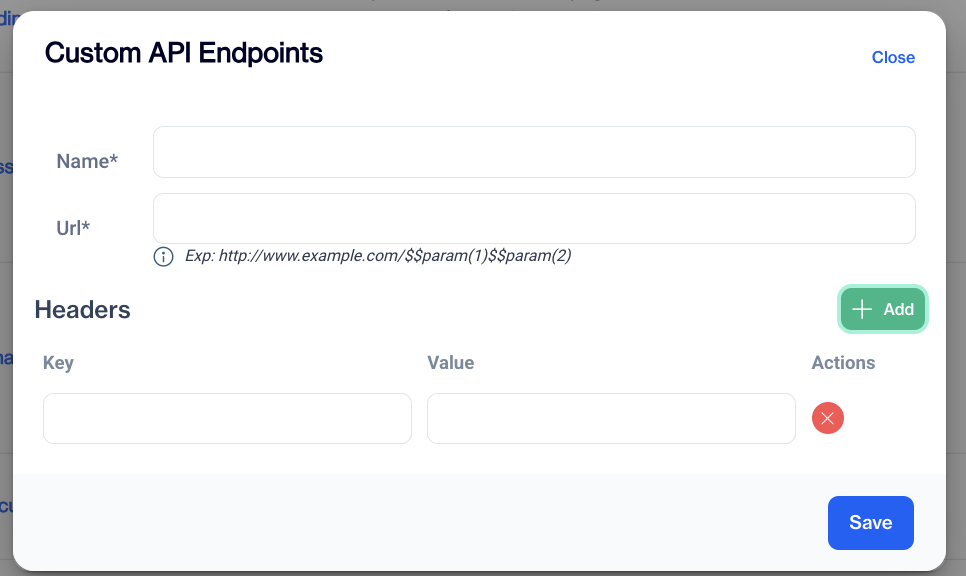
Adding Custom API Endpoints
- On the Custom API Endpoints screen, click the Add button.
- A pop-up window will appear with fields to input the following information:
Name: Enter a name for the API endpoint.
URL: Provide the API URL. Use parameters if required.
Example: http://www.example.com/$$param(1)$$param(2)
- (Optional) Click the Add button under the Headers section to include additional key-value pairs for the API request:
Key: Enter the header key.
Value: Enter the corresponding value for the key.
- Once all required fields are filled in, click the Save button to store your new API endpoint.
How to Delete an Existing API Endpoint
Follow these steps to delete an existing API endpoint from the Custom API Endpoints screen:
- On the Custom API Endpoints screen, locate the endpoint you want to delete in the list.
- Click on the Name of the endpoint.This will open a pop-up window displaying the details of the selected API endpoint.
- In the pop-up window, locate and click on the Trash Can icon.
The selected API endpoint will be removed from the list.
Related Articles
Develop your own WEB API
The Dengage Platform can invoke your Custom Web APIs during the audience export process. This section outlines the format of the data sent by the Dengage Platform, providing the necessary details for you to develop a function that receives and ...Custom Inline
The Custom Inline feature allows you to create personalized content directly within your website using HTML, CSS, or JavaScript. This functionality provides the flexibility to enhance user experience by incorporating unique design elements and ...Push Custom Parameters
The Push Custom Params feature allows users to define and manage custom parameters for push notifications. This customization enhances the personalization and functionality of push campaigns. Custom Params List Custom Params List: Displays all the ...Custom Reports - Charts
All Reports The report list is displayed in a table format that includes: Name: The title of the report. Use clear and descriptive names to easily identify its purpose and content. Type: Specifies the report type, such as Pivot Table, Big Number, ...API Users
This page enables you to create and authenticate API Users. The API Users section under Settings > Identity & Access Management allows you to manage API users for accessing your account. You can view, add, and manage API users with ease. Each API ...