Exporting Data to MySQL via ODBC in Automated Flows
The ODBC integration in Dengage allows users to export data from the Automated Flow module to various database systems, including MySQL.With the latest enhancements, users can now export data directly to their MySQL databases by defining an ODBC connection.
Important:MySQL is not listed as a standalone Remote Target option. However, it can be used seamlessly by configuring it under the ODBC type using the appropriate MySQL ODBC driver.
Prerequisite: Defining ODBC for MySQL
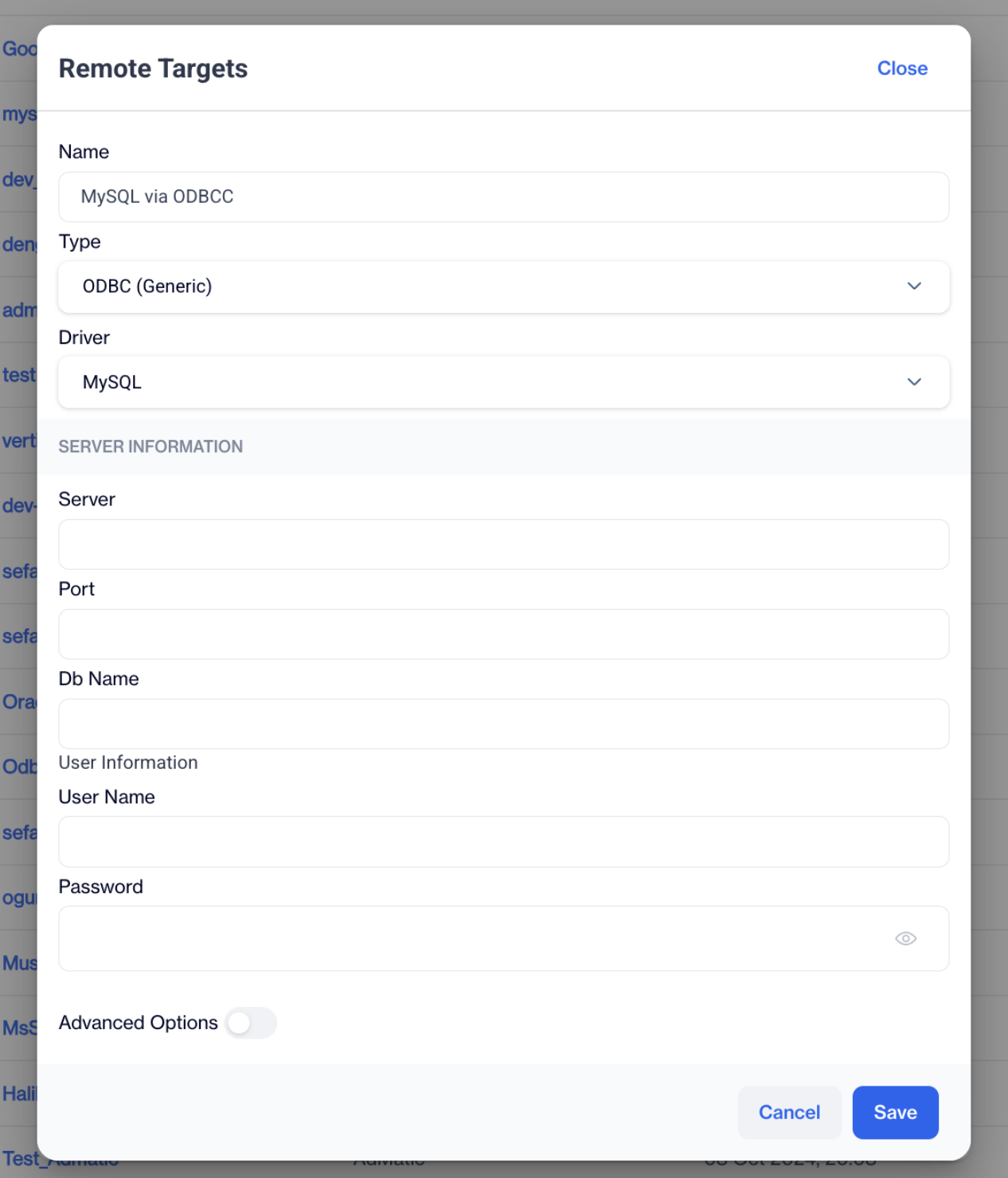
To export data to MySQL, you must first define it as an ODBC Remote Target.
- Navigate to Remote Targets:
Settings > Integrations > Remote Targets - Add a New Remote Target:
Click Add to open the configuration window.
- Enter Remote Target Details:
- Name: Enter a recognizable name (e.g., MySQL_Export).
- Type: Select ODBC.
- Driver: Choose the appropriate MySQL ODBC driver.
- Provide the necessary server information and user information.
- Save:
Click Save to register the connection.
MySQL
How to Access
Navigation Path:
Data Space > Data Management > Automated Flows
- Go to Data Space.
- Click Data Management.
- Open the Automated Flows section.
This is where you create and configure flows that export data to remote systems.
How to Use
1. Create a New Automated Flow
- Click the New button and choose Automated Flow.
- Enter a name, Start Date, and End Date.
- Click Next.
2. Add a Trigger
- Drag the trigger node to the canvas.
3. Add a Data Export Node
- Drag the Data Export node under the Actions section.
- Click the node to begin configuration.
4. Select Data Type
- Choose the desired data type.
- Click Next.
5. Choose Remote Target: MySQL via ODBC
You will not see “MySQL” as a standalone option.
Instead:
- Select the ODBC remote target previously configured with MySQL credentials.
- Click Next.
Related Articles
Exporting Incremental Logs to Databases via Remote Target
With this update, database export capability in the Automated Flow module has been enhanced. You can now export Incremental Logs directly to supported databases such as MySQL and others via Remote Target integration. Prerequisites A Remote Target ...Automated Flows
In which situation do I get an error on an automated flow which exports the data to Facebook? Errors in an automated data export flow to Facebook can occur for several reasons. These include the Meta link timed out, broken connection , or if Facebook ...Automated Flows
In the realm of data-driven marketing, automated flows are pivotal in orchestrating a sophisticated data management strategy that precedes and enhances communication efforts. These flows serve as an automated infrastructure that intelligently ...Automated Flows History
The Automated Flows History section provides a comprehensive history of automated flows, enabling users to track the execution and scheduling of these flows. This feature ensures easy access to past and upcoming flow runtimes for monitoring and ...Adding ODBC as Remote Target to Data Export
The ODBC Data Export feature allows users to export data directly to an ODBC database from the Automated Flow module. Depending on the availability of SELECT permissions on the customer’s ODBC server, users can either select a schema/table from a ...