Segmenting Users Who Click on Geofence Push Campaigns
The segmentation tool for Geofence Push Notifications has been enhanced to include a new "Clicked" option under the Users who section. This addition allows users to segment audiences who have clicked on push notifications, providing more refined insights.
How to Access
- Go to Audience > Segments.
- Click New to create a segment.
- Select the segment type as Interactive.
- Add a name and description for the segment, then click Next.
- In the Filters section:
- Locate the Geofence option from the dropdown menu under Behaviour.
- In the Users who dropdown, select Clicked to focus on users who interacted with notifications.
How to Use
- In the segmentation interface, configure the following fields:
- Geofence: Choose the geofence for segmentation.
- Users who: Select the interaction type. The options include:
- Entered
- Delivered
- Clicked (new addition).
Choose Clicked to focus on users who interacted with notifications by clicking.
- push any campaign or following campaign: Specify whether to target users from any push campaign or a specific campaign.
- within the last: Define the time range for segmentation, such as "within the last 30 days."
- Once you've configured the fields, click Add to generate the segment.
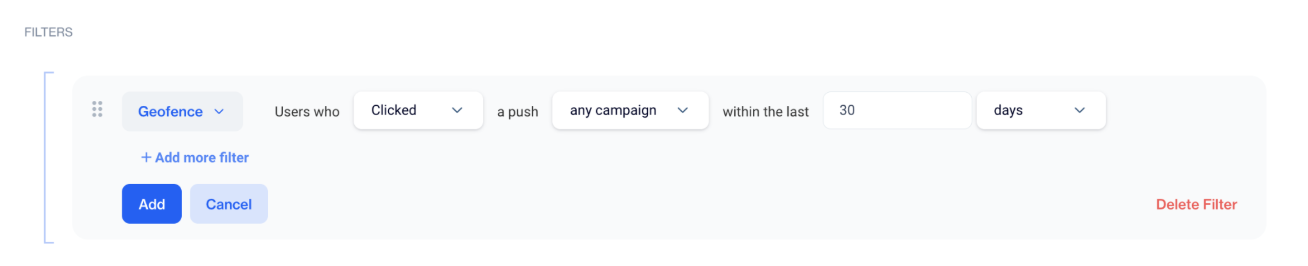
Creating the Segment
Related Articles
Push
Engage your audience in real time with powerful, personalized Push Notifications available for both mobile and web platforms. Whether you want to deliver instant updates, promote new content, or re-engage inactive users, our Push Notification system ...Push
This section explains the push function, enabling users to efficiently create push notifications. It facilitates swift communication by organizing pushes into folders for structured access. Additionally, users can create a new push notification by ...Geofence
This section will guide you through the process of creating and managing geofence clusters, as well as understanding how geofences function in the background once users grant location permission. A geofence is a virtual perimeter for a real-world ...Geofence - Frequency Capping Update
The Geofence - Frequency Capping Update gives you more control over how often users receive messages in location-based campaigns. Previously, frequency capping was mainly managed through campaign configuration rules. With this update, you can now ...Geofence Campaign - Add Segment
The "Geofence Campaign - Add Segment" feature ensures geofence-triggered notifications are sent exclusively to a selected segment of users. Previously, geofence campaigns targeted all users without the option to narrow the audience. This new ...